Next-generation business platform

Run your business your way.

Accentra brings CRM, sales, POS, inventory, accounting, HR, manufacturing, healthcare, WhatsApp and more into one modular platform that grows with you.

Start smallExpand anytimeOne connected platform
AccentraLive business view
RevenueRM 284K
Orders1,248
Customers8,904
WhatsAppConnectedStandard + Official
InventoryMulti-WarehouseReal-time availability
By industry

Find your business. See how it works.

Explore a focused Accentra workflow for your industry, then see the products that support it.

More industries

Explore more ways to work with Accentra.

Select an industry for its Accentra workflow and suggested modules.

← All industriesAccentra for Book Shop
Retail · Book Shop

Put the right title in the reader's hands.

Find books, complete sales and see which titles need replenishing.

MADE FOR YOUR WORK

See how Accentra supports Book Shop from first customer interest to daily operations.

ONE CONNECTED SALE

Fast checkout. A clearer bookshop record.

From a reader asking for a title to the next replenishment order, the sale stays connected.

01Find the titleSearch by name, SKU or barcode.
02Build the basketKeep books, stationery and gifts together.
03Take paymentComplete checkout with the enabled methods.
04Update stockKnow what sold and which title is running low.
05Keep contextRecognise your regular readers.
06See the resultReview the day by title and item.
ACCENTRA POINT OF SALE · BOOK SHOP

The title in front. The detail behind the sale.

Find the right title, serve the reader, and complete the sale from one clear checkout screen.
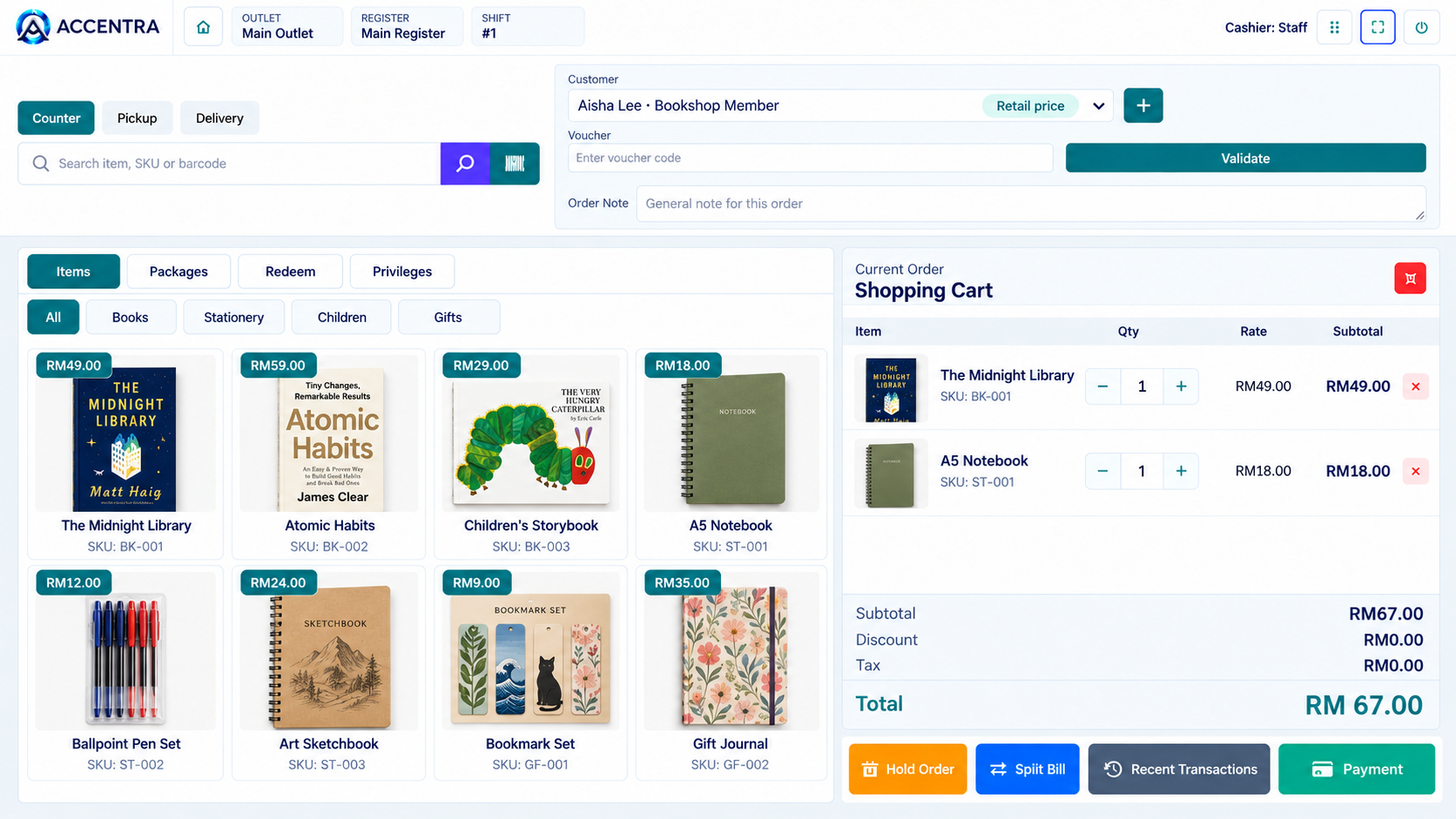
Find it fastSearch by item, SKU or barcode
Know your regularsCustomer and price in view
Keep every sale clearCart, quantity and total together
Accentra bookshop POS example showing books and stationery by category, customer selection, shopping cart and payment action
Accentra POS bookshop example · Sample products and prices
Browse your wayBooks, stationery, gifts and more
Serve every shopperCounter, pickup or delivery
Finish with confidenceHold, split or take payment
And that’s just the first chapter.
FIND THE RIGHT TITLE

From barcode to basket.

A reader is waiting? Search the item name, SKU or barcode from POS and bring the right product into the sale without hunting through a long list.

BOOK SHOP / ITEM LOOKUPEXAMPLE
BOOKS · FICTIONThe Midnight LibrarySKU: BK-001RM49.00
INVENTORY + PURCHASE

Keep the shelves ready.

See which titles are running low, review stock levels and plan replenishment before a favourite book disappears from the shelf.

Stock visibility uses Accentra Inventory. Supplier purchasing can be added as your operation needs it.

MORE THAN THE COUNTER

The details that make the day easier.

Choose the Accentra apps that fit your shop and bring the daily work together.

01

Clear sales view

Review what sold and follow the day’s results.

02

More than one cashier

Keep checkout moving across your team and registers.

03

Customer connection

Recognise regulars and keep their purchases in context.

04

Membership & Loyalty

Add rewards when your shop is ready for them.

05

Vouchers and offers

Give staff a clear path to validate a voucher at checkout.

06

Stock & purchasing

See what needs replenishing and prepare the next order.

Customer journey

Help the right people find you.

Help readers discover featured titles and contact the shop for availability.

01

Be discovered

Show what you offer and how to reach you on your website and relevant channels.

02

Capture interest

Give each visitor a clear way to enquire, book or order.

03

Deliver the work

Move the request into the relevant Accentra workflow for your team.

04

Keep the relationship

Use customer records and follow-up to support the next interaction.

Show customers what you offer and give them an easy next step. Online ordering and booking options vary with the Accentra apps you choose.

ONE CONNECTED BUSINESS

The apps around every sale.

POS starts the sale. Connect the apps that keep the shelves, readers and accounts in view.

01

POS

Find books and complete checkout.

02

Inventory

Track titles and stock quantities.

03

Loyalty

Reward readers who return.

04

Purchase

Replenish popular titles.

05

Accounting

Bring sales and payments into finance.

eInvoice and online ordering can join when enabled for your operation.

BUILD YOUR SETUP

One need, one Accentra app.

Start with the modules relevant to this workflow and add the others when your business needs them.

Choose the apps that fit your business. See the right combination in an Accentra demo.

Let's map Accentra to your Book Shop operation.

Tell us your current process and we’ll show the relevant workflow and options.

Talk to Accentra

Screens are examples. Explore the details that matter to your business in a demo.
← All industriesAccentra for Grocery & Supermarket
Retail · Grocery & Supermarket

Keep every basket moving.

Serve shoppers at the counter, keep essentials in view and get ahead of the next restock.

BUILT FOR BUSY SHOP FLOORS

Make checkout feel easy today while keeping tomorrow’s shelves ready.

ACCENTRA POINT OF SALE · GROCERY

A full basket. A clear checkout.
A better shopping day.

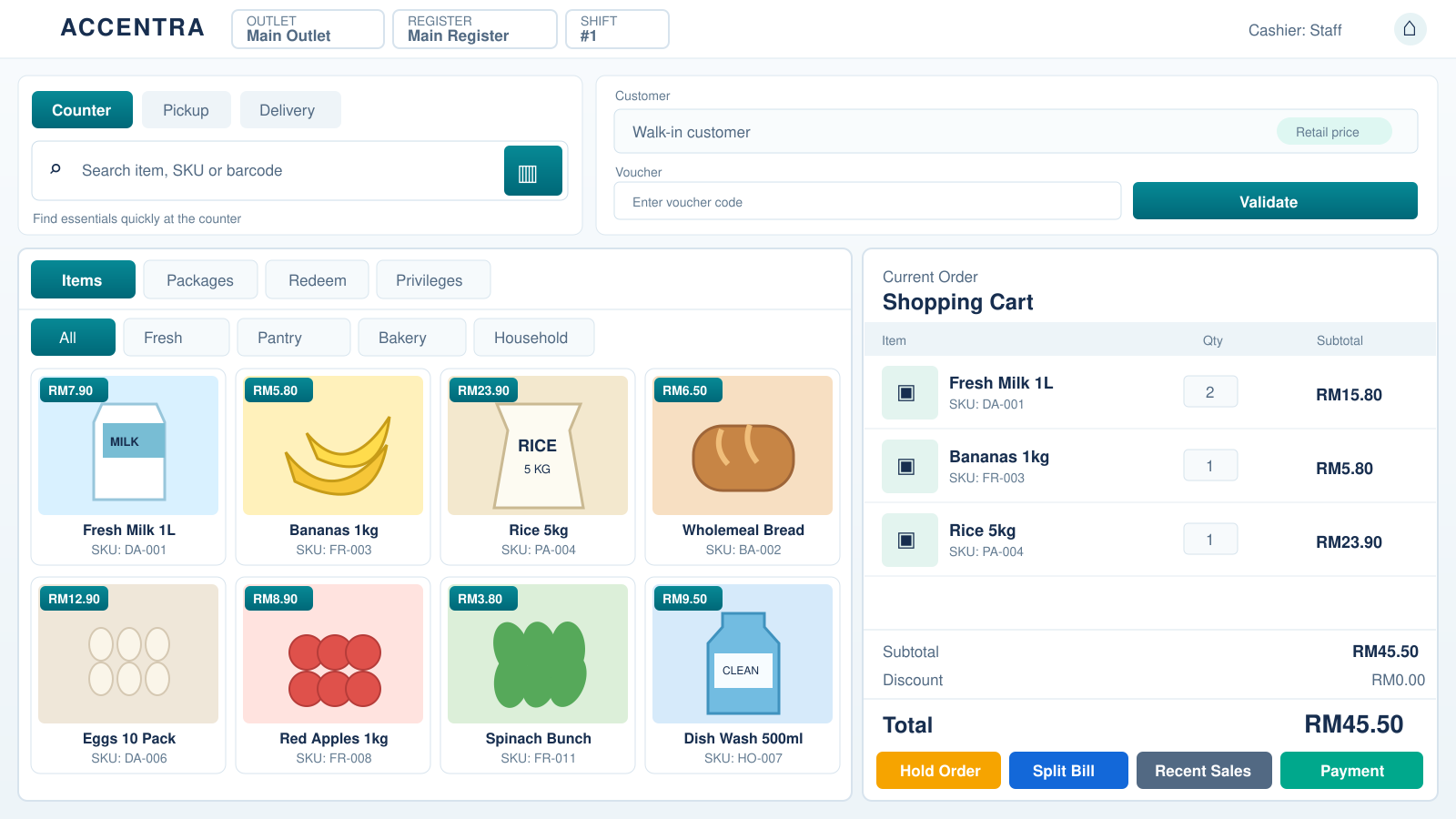
From fresh produce to pantry staples, keep the basket, customer and total in one view.

Scan and findSearch by item, SKU or barcode
Serve regularsCustomer and price in view
Know the totalEvery item in one cart
Illustrative Accentra grocery POS with fresh milk, bananas, rice, bread and a shopping cart totalling RM45.50
Illustrative Accentra Grocery POS · Sample items and prices
Browse the aislesFresh, pantry, bakery and household
Choose the serviceCounter, pickup or delivery paths
Move the queueHold, split or take payment
The sale is only part of the story.
SHOPPER EXPERIENCE

Give shoppers more reasons to return.

Keep the regular shop convenient. Add the offers and connections that suit your store.

Promotions

Put relevant offers in front of shoppers at the right time.

Vouchers

Validate a voucher at checkout without breaking the flow.

Membership

Recognise returning customers with the Loyalty add-on.

Flexible fulfilment

Set up pickup or delivery paths when your operation supports them.

Promotions, membership and fulfilment options depend on the Accentra apps and configuration you choose.

FAST ITEM LOOKUP

One scan. Keep the queue moving.

Find everyday products by name, SKU or barcode, then bring them straight into the basket. Your team spends less time searching and more time serving.

GROCERY / ITEM LOOKUPEXAMPLE
FRESH · DAIRYFresh Milk 1LSKU: DA-001RM7.90
Product datesExample view
ItemFresh Milk 1L
BatchDA-2410
Best before12 Oct 2026
Review by09 Oct 2026
Review short-dated items
PERISHABLES

See the dates. Act while it counts.

For products with batch and expiry details recorded, give your team a clearer view of what needs attention before it becomes waste.

Batch and date tracking depends on your Inventory setup.

INVENTORY + PURCHASE

Restock before the rush.

Keep an eye on everyday essentials, review low quantities and prepare supplier orders when shelves need topping up.

Inventory provides stock visibility. Add Purchase to manage supplier orders in the same Accentra ecosystem.

MORE THAN A CHECKOUT

The everyday details, handled together.

Start with the apps you need and connect more of your store as it grows.

01

Fast checkout

Find items, build the basket and settle the sale.

02

More than one register

Keep different counters and cashiers moving.

03

Member connection

Add rewards for repeat shoppers with Membership & Loyalty.

04

Stock visibility

See quantities and notice what needs attention.

05

Supplier purchasing

Bring replenishment into the flow with Purchase.

06

Sales and accounts

Review results and connect financial records with Accounting.

REACH SHOPPERS

Make the next visit easy to plan.

Show store hours, location and current offers on your website. Add connected ordering channels when they fit your business.

01

Be found

Help local shoppers find your outlet and opening hours.

02

Show the offer

Highlight the essentials, categories and promotions that matter.

03

Serve the basket

Bring orders into your configured store workflow.

04

Welcome them back

Keep the relationship going with customer and membership tools.

THE WORKING DAY

From first scan to next restock.

Checkout and stock decisions belong to the same daily story.

01Find item
02Build basket
03Take payment
04Review stock
BUILD YOUR SETUP

One need, one Accentra app.

Choose the apps for your counters, shelves and customer experience.

Your Accentra setup can be tailored to your store. Ask for a demo of the apps you need.

Let's map Accentra to your grocery operation.

Tell us how your store runs and we’ll show the relevant counters, stock and customer workflows.

Talk to Accentra

Screen and data are illustrative. Features depend on your selected apps and setup.

← All industriesAccentra for Retail & eCommerce
Retail · Retail & eCommerce

One sale, wherever your customer shops.

Connect store checkout and configured online orders with stock, fulfilment and finance.

MADE FOR YOUR WORK

Make the sale easy today and keep the business behind it connected.

ONE CONNECTED SALE

Fast checkout. A clearer business record.

From the first item to payment and finance, shape the flow for retail & ecommerce.

01Find the itemSearch by name, SKU or barcode.
02Build the basketApply the configured customer price.
03Take paymentComplete the in-store checkout.
04Update stockKeep the item record connected.
05Fulfil ordersWork through store and online orders.
06See the resultReview what sold and where.
ACCENTRA POINT OF SALE · RETAIL

The checkout in front. The business behind the sale.

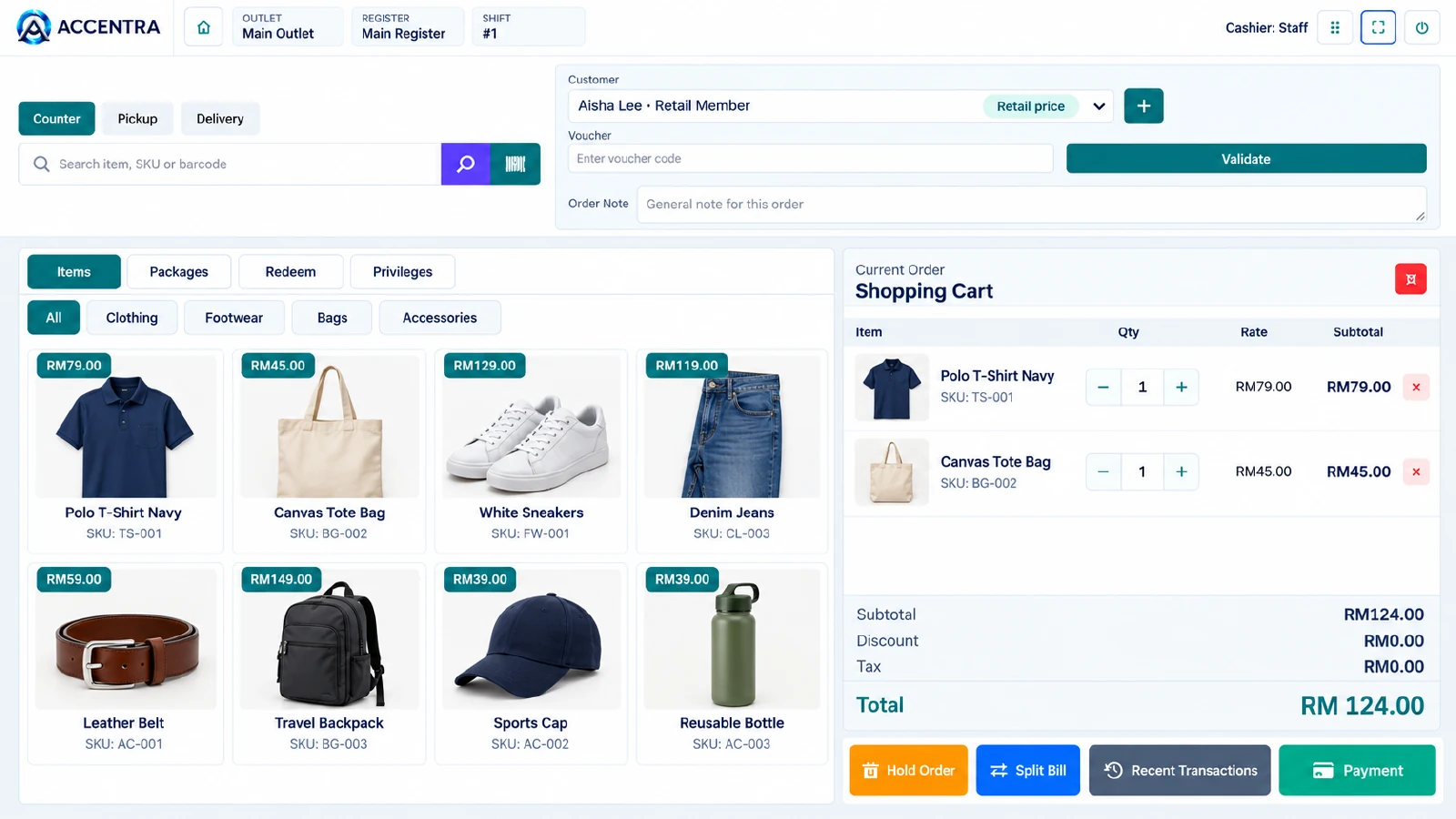
Give staff a clear checkout while configured online orders join the wider sales workflow.

Find it fastSearch item, SKU or barcode
Know your customerCustomer and price in view
Keep the basket clearItems, quantity and total together
Illustrative Accentra retail POS with clothing, accessories, customer selection, shopping cart and payment action
Accentra retail POS example · Sample products and prices
Sell in storeA clear counter checkout
Serve online ordersConfigured channels and fulfilment
Finish with confidencePayment and next steps in view
The sale is only part of the story.
ONE ITEM RECORD

Keep store and online sales aligned.

Use a consistent item catalogue and Inventory visibility as configured, then handle external orders through Omni Channel.

Retail sale · Example
Store checkoutPOS basket and payment
Online orderConfigured channel handoff
Stock viewInventory quantity and status
Omni Channel connections vary by provider and account.
REACH MORE SHOPPERS

Sell across the channels your customers use.

Your store, webshop and relevant marketplaces can work as part of one Accentra sales journey when the connections are configured.

Shopee · Lazada · TikTok Shop · WooCommerce · Shopify · Amazon · eBay · Temu · Zalora · and more

01Be seen in more placesMeet shoppers in your store and on relevant online channels.
02Bring orders togetherWork with eligible channel orders through Accentra Omni Channel.
03Keep stock in viewUse the connected item and Inventory records as sales move.
04See what sellsReview the results across your configured selling paths.

Channel availability and live features depend on the provider connection and your Accentra setup.

REACH SHOPPERS

One store. More ways to shop.

Show products on your site or relevant marketplaces, and bring eligible orders into Accentra through configured connections.

01

Be found

Show products and offers.

02

Take interest

Give shoppers a clear order path.

03

Fulfil

Prepare pickup or delivery.

04

Bring them back

Keep the customer context.

ONE CONNECTED BUSINESS

The apps around every sale.

Choose the Accentra apps that connect retail & ecommerce sales with your customers, stock and finance.

01

POS

Complete in-store sales.

02

Inventory

Keep items and stock in view.

03

Omni Channel

Connect eligible online orders.

04

Purchase

Replenish what is selling.

05

Accounting

Bring sales and payments into finance.

Shopee, Lazada and TikTok are examples of relevant channels. Live functions depend on configured, supported connections. eInvoice and Loyalty can be added when needed.

BUILD YOUR SETUP

One need, one Accentra app.

Start with the modules relevant to this workflow and add the others when your business needs them.

Choose the apps that fit your business. See the right combination in an Accentra demo.

Let’s map Accentra to your Retail & eCommerce business.

Tell us how you sell in store and online. We’ll show the workflow and apps that fit.

Talk to Accentra

Screens and figures are illustrative. External channel functions depend on supported connections and configuration.

← All industriesAccentra for Fashion & Garments
Retail · Fashion & Garments

Make every style easier to find and sell.

Help shoppers choose the right item, complete checkout and see what needs replenishing.

MADE FOR YOUR WORK

Make the sale easy today and keep the business behind it connected.

ONE CONNECTED SALE

Fast checkout. A clearer business record.

From the first item to payment and finance, shape the flow for fashion & garments.

01Find the styleSearch the catalogue or scan a tag.
02Check the optionSelect the relevant size and colour.
03Build the basketSee each item and its price clearly.
04Take paymentFinish the in-store sale.
05Review stockSee which options need attention.
06Know the trendReview what customers choose.
ACCENTRA POINT OF SALE · FASHION

The style in front. The details behind the sale.

Find the item, keep the customer and basket in view, and complete the sale with confidence.

Find the styleSearch clothing or scan a tag
See the customerRelevant customer and price
Review the basketQuantity and total together
Illustrative Accentra retail POS with clothing, accessories, customer selection, shopping cart and payment action
Accentra fashion retail POS example · Sample products and prices
Browse the rangeClothing, bags and accessories
Keep options clearStyle and item details in view
Finish the saleTake payment at checkout
The sale is only part of the story.
STYLES + OPTIONS

Make the right option easier to find.

Organise clothing by style, size and colour in your configured item catalogue, then use Inventory to review availability.

Style options · Example
Polo T-shirt NavySizes S · M · L
Canvas Tote BagNatural · One size
Denim JeansSizes 28 · 30 · 32
Illustrative item structure; your own catalogue defines the options.
REACH SHOPPERS

Make the next collection easy to discover.

Show your styles online and guide shoppers toward your store or enabled order channels.

01

Show the collection

Feature new arrivals.

02

Help them choose

Present styles and options.

03

Serve the order

Use the configured sales path.

04

Welcome them back

Keep customer context.

ONE CONNECTED BUSINESS

The apps around every sale.

Choose the Accentra apps that connect fashion & garments sales with your customers, stock and finance.

01

POS

Sell apparel at the counter.

02

Inventory

Review styles and stock.

03

Omni Channel

Connect eligible online orders.

04

Loyalty

Recognise repeat shoppers.

05

Accounting

Bring sales and payments into finance.

Purchase can support replenishment; eInvoice can join when enabled. Online channel functions depend on supported connections.

BUILD YOUR SETUP

One need, one Accentra app.

Start with the modules relevant to this workflow and add the others when your business needs them.

Choose the apps that fit your business. See the right combination in an Accentra demo.

Let’s map Accentra to your Fashion & Garments business.

Tell us how you sell in store and online. We’ll show the workflow and apps that fit.

Talk to Accentra

Screens and figures are illustrative. External channel functions depend on supported connections and configuration.

← All industriesAccentra for Hardware Store
Retail · Hardware Store

The right part. Ready for the next job.

Help walk-in and trade customers find the right item, check the detail and leave with a clear sale. Keep stock and purchasing connected behind the counter.

MADE FOR YOUR WORK

Serve the customer in front of you and keep the parts, stock and numbers behind every sale in view.

ONE CONNECTED SALE

Quick at the counter. Clear beyond the sale.

From a specific fitting to a full project basket, give your team a practical path through the working day.

01Find the itemSearch by name, SKU or barcode.
02Check the detailConfirm size, specification and availability from your item record.
03Build the basketSee quantities, customer and configured prices.
04Take paymentFinish the counter sale with enabled methods.
05Keep stock in viewReview the items that need replenishment.
06Plan the next orderPurchase from suppliers as demand changes.
ACCENTRA POINT OF SALE · HARDWARE

Find the part. Keep the job moving.

Put the item and its key details close to the counter conversation.

Find it fastName, SKU or barcode
Check the fitSizes and specifications from your catalogue
Build the basketItems and quantities together
Illustrative hardware store POS showing product categories, sample items, an item specification and a checkout basket
Illustrative Accentra hardware POS concept · Sample items and prices
Serve every customerWalk-in and trade details in view
Know what's availableStock context for the next job
Finish the saleClear totals and checkout action
The right item is only the beginning.
THE DETAIL BEHIND THE PART

The right specification, right where you need it.

A hardware sale often starts with a measurement or material. Keep those details in the item record so staff can confirm the choice, then check quantity and price before checkout.

Item record · Example
ItemHex bolt M8 × 50 mm
SpecificationStainless steel · pack of 10
SKUBLT-M8-50-SS
StockAvailability in Inventory
Sample data. Your own catalogue defines item details and stock visibility.
REACH THE NEXT PROJECT

Make it easy to find you. Easy to ask.

Show the categories you stock, your opening hours and a clear route for customers to enquire about the parts they need.

01

Show the range

Tools, fasteners, paint, plumbing and your own categories.

02

Take enquiries

Give project customers an easy way to ask about a product.

03

Prepare the sale

Help staff check the item and quantity before fulfilment.

04

Keep the connection

Use customer context for the next visit or project.

Online ordering and external channel options depend on the apps and connections you choose.

ONE CONNECTED BUSINESS

The apps around every sale.

Give the counter team a simple sale while the right Accentra apps support stock, purchasing and finance.

01

POS

Find parts and complete counter sales.

02

Inventory

See item records and stock status.

03

Purchase

Replenish from suppliers.

04

Accounting

Connect sales and payments to finance.

05

Omni Channel

Add eligible online sales paths.

Choose only the apps your hardware business needs. eInvoice and customer programmes can be added where relevant.

BUILD YOUR SETUP

One need, one Accentra app.

Start at the counter, then add the connected work that fits your operation.

See the right combination for your store in an Accentra demo.

Let's map Accentra to your hardware store.

Show us how customers find parts, how you manage stock and how you buy from suppliers. We'll show the workflow that fits.

Talk to Accentra

Screens and figures are illustrative. Available functions depend on your configuration.

← All industriesAccentra for Furniture Store
Retail · Furniture Store

From the showroom to the living room.

Help customers choose the right piece, capture the order and coordinate the next step from stock to delivery.

MADE FOR YOUR WORK

A considered purchase deserves a clear path from interest to arrival.

ONE CONNECTED SALE

A confident sale. A clearer delivery plan.

Keep the choice, order and fulfilment together as a customer plans a room.

01Explore the rangeShow styles and product options.
02Confirm the detailsCheck dimensions, finish and availability.
03Capture the customerKeep the right delivery and contact details.
04Complete the saleConfirm the chosen items and payment.
05Plan fulfilmentPrepare collection or delivery.
06See the resultReview the sale and stock movement.
ACCENTRA POINT OF SALE · FURNITURE STORE

Show the choice. Make the next step clear.

Help staff turn showroom interest into an order with the right product and delivery details.

Explore optionsStyles and finishes in view
Check the fitDimensions and item detail
Confirm the choiceSelected pieces and quantity
Illustrative Furniture Store point of sale concept with sample products and checkout basket
Illustrative Accentra Furniture Store POS concept · Sample items and prices
Know the customerOrder and contact details
Plan arrivalCollection or configured delivery
Finish confidentlyClear total and checkout
The sale continues after the showroom.
THE DETAIL BEHIND THE SALE

The piece, the finish, the plan.

Furniture buyers need more than a product name. Keep your item options and dimensions clear, then carry the selected piece into the sale and fulfilment plan.

Furniture Store · Example
ItemOak dining table
Dimensions180 × 90 cm
FinishNatural oak
Next stepDelivery arrangement
Sample item data. Product options and fulfilment depend on your setup.
REACH CUSTOMERS

Let the collection start the conversation.

Show room ideas, collections and key dimensions, with a clear way to enquire before a showroom visit.

01

Show the range

Present collections and room ideas.

02

Capture interest

Receive questions about size, finish or availability.

03

Confirm the order

Bring selected items into the sale.

04

Arrange arrival

Prepare collection or delivery.

ONE CONNECTED BUSINESS

The apps around every sale.

Choose the Accentra apps that connect the customer-facing work with what happens behind it.

01

CRM & Leads

Follow up on showroom enquiries.

02

POS

Complete the sale.

03

Inventory

Check items and availability.

04

Delivery Hub

Arrange configured fulfilment.

05

Accounting

Bring the sale into finance.

Purchase can support supplier orders. Delivery options depend on your configured provider or own-driver workflow.

BUILD YOUR SETUP

One need, one Accentra app.

Start with the apps relevant to your operation and add others when you need them.

See the right combination for your business in an Accentra demo.

Let's map Accentra to your furniture store.

Tell us how customers choose, pay and receive furniture. We’ll show the flow that fits.

Talk to Accentra

Screens and figures are illustrative. Available functions depend on your configuration.

← All industriesAccentra for Electronics Store
Retail · Electronics Store

The right model. A more confident sale.

Give shoppers a clear way to compare models and accessories, then connect the checkout with stock and follow-up.

MADE FOR YOUR WORK

Help shoppers make a decision today and keep the model, sale and after-sale context together.

ONE CONNECTED SALE

Clear comparisons. Confident checkout.

From a model question to a completed purchase, keep the details easy to find.

01Find the modelSearch the catalogue by name, SKU or barcode.
02Compare the detailCheck configured specifications and variations.
03Check availabilitySee the relevant stock status.
04Build the basketAdd the device and matching accessories.
05Complete checkoutTake payment with enabled methods.
06Keep the recordSupport the next customer interaction.
ACCENTRA POINT OF SALE · ELECTRONICS STORE

See the model. See the whole sale.

Keep the device, specification and useful accessories in one clear counter view.

Find the modelName, SKU or barcode
Check the specModel and variant detail
Add accessoriesRelevant items in the basket
Illustrative Electronics Store point of sale concept with sample products and checkout basket
Illustrative Accentra Electronics Store POS concept · Sample items and prices
Check availabilityStock status in view
Capture the customerKeep the sale context
Complete checkoutTotal and payment action
A device sale is the start of the relationship.
THE DETAIL BEHIND THE SALE

Model details that make the choice easier.

Put the configured model, capacity and variant near the sale so staff can confirm exactly what the shopper selected.

Electronics Store · Example
ItemNotebook 14
Configuration16 GB / 512 GB
ColourGraphite
SKUNB14-16-512-GR
Illustrative product data. Warranty handling uses the appropriate configured app and policy.
REACH CUSTOMERS

Help shoppers compare before they visit.

Present key models and their useful details online, then give customers a clear next step.

01

Show models

Highlight the range and variants.

02

Answer questions

Let buyers ask about specifications.

03

Complete the sale

Serve in store or through configured channels.

04

Stay connected

Keep purchase context for follow-up.

ONE CONNECTED BUSINESS

The apps around every sale.

Choose the Accentra apps that connect the customer-facing work with what happens behind it.

01

POS

Complete device and accessory sales.

02

Inventory

See models and variants.

03

Omni Channel

Connect eligible online orders.

04

Warranty

Support configured after-sale cover.

05

Accounting

Bring the sale into finance.

Purchase can support replenishment. Warranty Management and Omni Channel are added when relevant to your operation.

BUILD YOUR SETUP

One need, one Accentra app.

Start with the apps relevant to your operation and add others when you need them.

See the right combination for your business in an Accentra demo.

Let's map Accentra to your electronics store.

Tell us what you sell, how customers compare products and what happens after checkout.

Talk to Accentra

Screens and figures are illustrative. Available functions depend on your configuration.

← All industriesAccentra for Pharmacy
Retail · Pharmacy

Everyday retail, with pharmacy care in view.

Support retail checkout and inventory alongside the dedicated dispensing workflow when Accentra Pharmacy is enabled.

MADE FOR YOUR WORK

Bring everyday sales and the dedicated pharmacy workflow into a clearer operation.

ONE CONNECTED SALE

A clear counter. A connected pharmacy record.

Separate ordinary retail checkout from prescription dispensing while keeping the relevant work connected.

01Receive the requestIdentify retail item or prescription path.
02Check the itemReview the relevant item and stock details.
03Use Pharmacy workflowHandle prescription dispensing in the dedicated app.
04Complete the saleTake payment through the configured checkout.
05Review stockKeep availability and replenishment in view.
06See the resultBring sales and finance together.
ACCENTRA POINT OF SALE · PHARMACY

A simple retail sale. A dedicated dispensing path.

Serve everyday pharmacy retail at the counter; use the Pharmacy app for prescription work.

Find retail itemsSearch the item catalogue
Check availabilityStock context in view
Build the basketClear quantity and total
Illustrative Pharmacy point of sale concept with sample products and checkout basket
Illustrative Accentra Pharmacy POS concept · Sample items and prices
Choose the right pathRetail or Pharmacy workflow
Keep records connectedRelevant sale and item details
Complete checkoutConfigured payment methods
Different requests need the right workflow.
THE DETAIL BEHIND THE SALE

The right path for every request.

Everyday retail items belong in a clear POS basket. Prescription dispensing belongs in the dedicated Accentra Pharmacy workflow with the professional checks and records your operation requires.

Pharmacy · Example
Retail requestCounter item → POS checkout
PrescriptionPharmacy dispensing workflow
Stock viewInventory item availability
FinanceSales and payment records
Illustrative flow. Dispensing is performed by authorised pharmacy staff under applicable local rules.
REACH CUSTOMERS

Make your pharmacy easy to reach.

Help customers find your location, hours and contact details, with clear information about your services.

01

Be found

Show location and opening hours.

02

Explain services

Make pharmacy services easy to understand.

03

Take enquiries

Give customers a direct contact path.

04

Serve in store

Route each request to the right workflow.

ONE CONNECTED BUSINESS

The apps around every sale.

Choose the Accentra apps that connect the customer-facing work with what happens behind it.

01

Pharmacy

Handle prescription dispensing.

02

POS

Complete everyday retail sales.

03

Inventory

See item and stock context.

04

Purchase

Replenish with suppliers.

05

Accounting

Connect sales and payments to finance.

Use the Pharmacy app for dispensing. Other apps are selected according to the operation and local requirements.

BUILD YOUR SETUP

One need, one Accentra app.

Start with the apps relevant to your operation and add others when you need them.

See the right combination for your business in an Accentra demo.

Let's map Accentra to your pharmacy.

Tell us how you handle retail sales, dispensing and stock. We’ll show the appropriate Accentra setup.

Talk to Accentra

Screens and figures are illustrative. Available functions depend on your configuration.

← All industriesAccentra for Café
Food & Hospitality · Café

A better rhythm from counter to cup.

Take the order, serve promptly and see what needs restocking before the next rush.

MADE FOR YOUR WORK

See how Accentra supports Café from first customer interest to daily operations.

ONE CONNECTED SALE

Fast service. A clearer café record.

Keep the order moving from counter or table to preparation, payment and the next busy hour.

01Take the orderCounter, waiter or enabled digital path.
02Route preparationSend drinks and food to the right station.
03Serve the guestSee what is ready for table or pickup.
04Take paymentSettle with enabled methods.
05Keep stock in viewKnow which ingredients and items need attention.
06Review the daySee top items and outlet activity.
Customer journey

Help the right people find you.

Show the menu, opening hours and location, with a clear route to visit or enquire.

01

Be discovered

Show what you offer and how to reach you on your website and relevant channels.

02

Capture interest

Give each visitor a clear way to enquire, book or order.

03

Deliver the work

Move the request into the relevant Accentra workflow for your team.

04

Keep the relationship

Use customer records and follow-up to support the next interaction.

Show customers what you offer and give them an easy next step. Online ordering and booking options vary with the Accentra apps you choose.

How service connects

From the first coffee to the happy customer.

An order begins at the counter, at a table or through a digital channel. Accentra brings the service team and preparation team into the same flow.

01
Every order has a clear starting point.Use the paths your venue offers.
01Walk-in counter
02QR self-order
03Waiter at table
04Connected delivery
02
Accentra POS captures the order.Table, item and service details stay together.
ORDER IN SERVICETable 052 × Cappuccino1 × Butter croissant
03
Send items to the right team.Each station sees what it needs to prepare.
Barista
Kitchen
Pastry
Pickup
04
Kitchen Display System & printersThe preparation handoff that keeps service moving.

Your barista and kitchen team see what to make next, while ready orders move back to service.

NewOrder 042

Cappuccino

PreparingOrder 041

Lunch special

ReadyOrder 040

Butter croissant

05Food & drinks readyThe team sees what is ready.
06Serve the guestBring the order to the table or pickup point.
07Take paymentUse your enabled payment methods.
Keep stock and finances connectedInventory, Accounting and e-Invoice can join the flow.
See how the day is goingReview sales, top items and outlet activity.

Choose the ordering, kitchen and payment options that suit your café.

Accentra in service

The order in front. The service behind it.

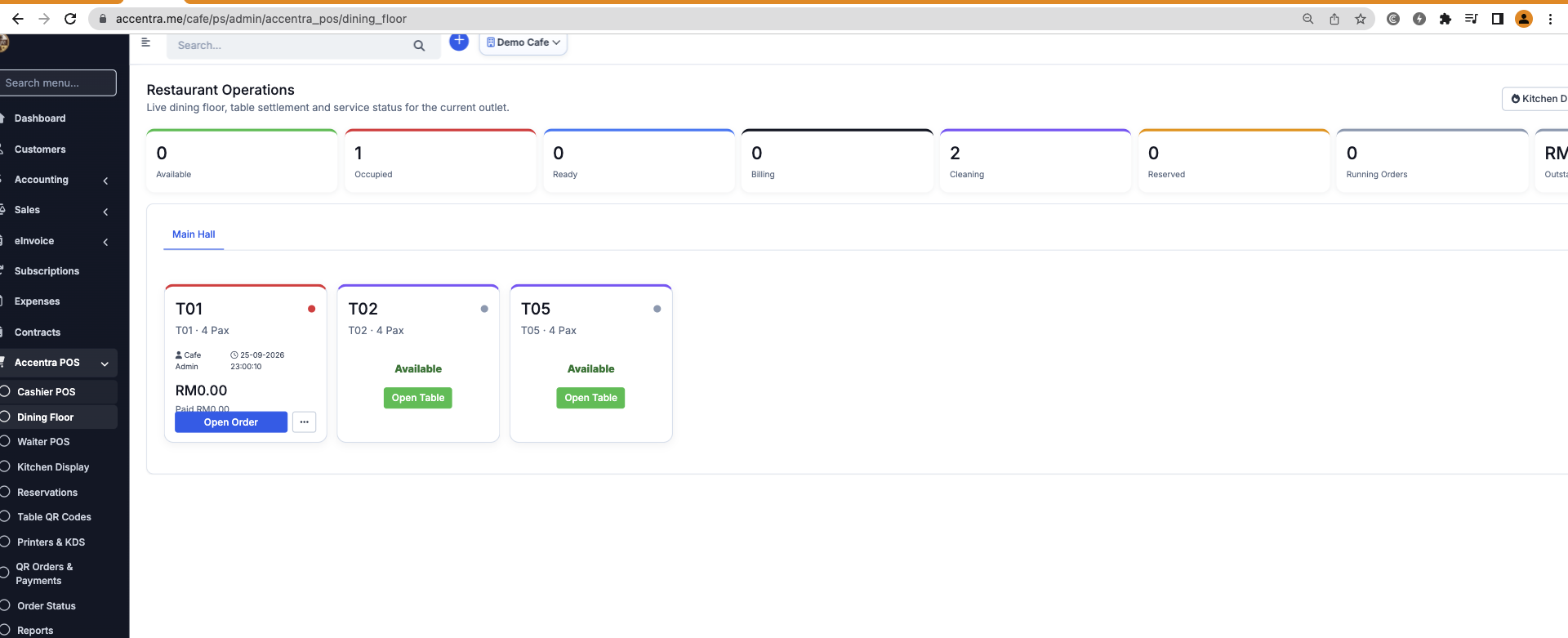
These Accentra POS demo screens show how the dining floor and waiter team work together. Your café can use the service flow that fits its tables and counter.

Dining floor

Know which table needs attention.

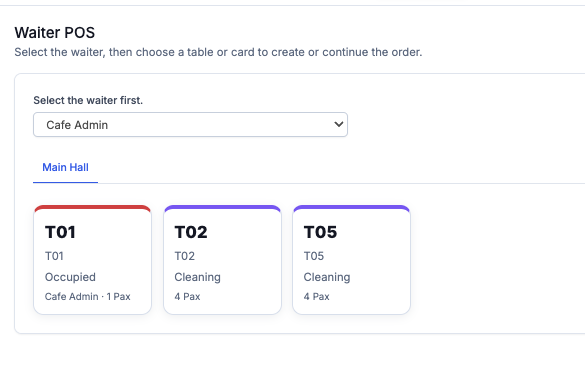
See available, occupied, ready, billing and cleaning states, then open the table order from the floor view. Staff can follow service as tables turn over.

Accentra POS dining floor demo showing table status cards
Actual Accentra POS demo screen · Sample table data
Accentra Waiter POS demo with waiter selection and table cards
Actual Accentra Waiter POS demo screen · Sample data
Waiter POS

Put the next order on the right table.

Select the waiter, choose a table, and create or continue the order. The dining-floor status stays visible to the service team.

Kitchen Display System

The handoff that keeps service moving.

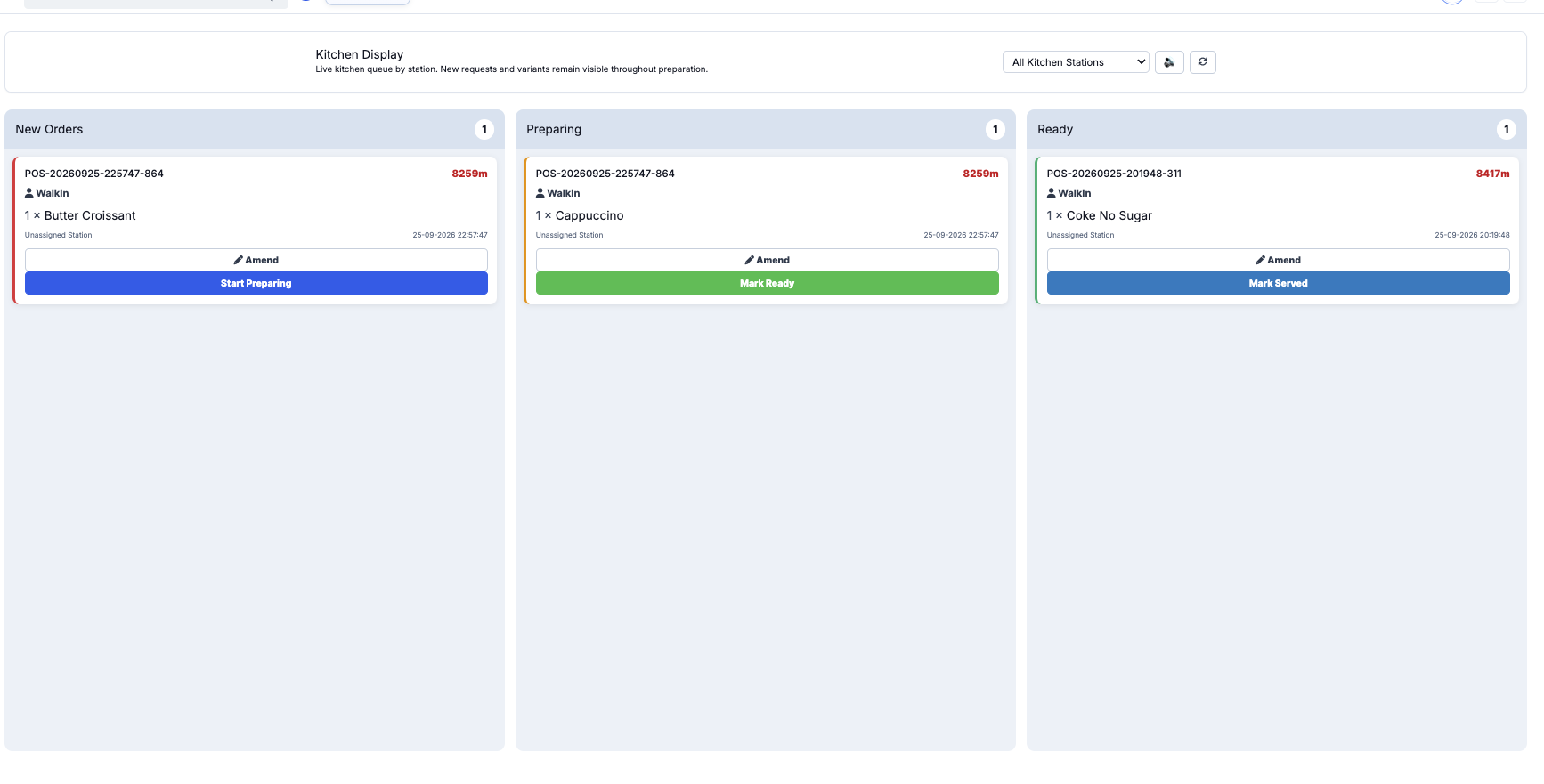
New requests and changes stay visible during preparation. Orders move from New to Preparing to Ready, so staff know what to serve next.

Sample orders show the flow. Your display will show your own stations and service times.

Kitchen DisplayBarista station · SAMPLE
NewOrder 0411 × House specialStart preparing
PreparingOrder 0402 × Main courseMark ready
ReadyOrder 0391 × DessertServe order
Actual Accentra Kitchen Display demo showing New, Preparing and Ready lanes with sample orders
Actual Accentra KDS demo capture · Sample orders and recorded timings.
Appointments add-on · Online table booking

Table booking, made easy.

Let guests choose a preferred date, time and party size online. Your team can review the request, confirm the table and prepare café service in Accentra POS.

Accentra POS dining floor demo showing table availability and service status
Actual Accentra dining-floor demo
TABLE REQUESTFind your table
Preferred dateFriday, 09 Oct
Time7:30 PM
Guests4 people
Send booking request
Illustrative Appointments view

Appointments adds the online booking path. Accentra POS helps your team manage tables and service; connect the two for a joined-up booking experience.

What matters here

A connected counter.

Keep café menu items, orders and stock information in one working flow.

See how this workflow fits your team and daily operations.

ILLUSTRATIVE WORKSPACEA connected counterPrepare → Serve and pay
Take orderReplenish
ONE CONNECTED BUSINESS

The apps around every sale.

POS connects front of house to preparation. Add the apps that support a busy café.

01

POS

Take counter and table orders.

02

Inventory

Keep menu items and stock visible.

03

Loyalty

Give regulars a reason to return.

04

Purchase

Replenish before the rush.

05

Accounting

Bring sales and payments into finance.

Appointments can add table booking; eInvoice and online channels can join when enabled.

BUILD YOUR SETUP

One need, one Accentra app.

Start with the modules relevant to this workflow and add the others when your business needs them.

KDS & kitchen printersDisplays and printer routing as part of the POS configuration for your venue.

Choose the apps that fit your business. See the right combination in an Accentra demo.

Let's map Accentra to your Café operation.

Tell us your current process and we’ll show the relevant workflow and options.

Talk to Accentra

Screens are examples. Explore the details that matter to your business in a demo.
← All industriesAccentra for Restaurant
Food & Hospitality · Restaurant

Bring the dining room and kitchen together.

Follow the guest order from table or counter through preparation and payment.

MADE FOR YOUR WORK

See how Accentra supports Restaurant from first customer interest to daily operations.

Customer journey

Help the right people find you.

Make menus, hours and enquiries easy to find, with digital ordering as an option.

01

Be discovered

Show what you offer and how to reach you on your website and relevant channels.

02

Capture interest

Give each visitor a clear way to enquire, book or order.

03

Deliver the work

Move the request into the relevant Accentra workflow for your team.

04

Keep the relationship

Use customer records and follow-up to support the next interaction.

Show customers what you offer and give them an easy next step. Online ordering and booking options vary with the Accentra apps you choose.

How service connects

From customer order to happy customer.

Bring walk-in, QR, waiter and connected delivery orders together, then send each item to the kitchen team that prepares it.

01
Every order has a clear starting point.Use the paths your venue offers.
01Walk-in guest
02QR self-order
03Waiter ordering
04Connected delivery
02
Accentra POS captures the order.Table, item and service details stay together.
ORDER IN SERVICETable 122 × Main course1 × Fresh juice
03
Send items to the right team.Each station sees what it needs to prepare.
Kitchen
Bar
Dessert
Bakery
04
Kitchen Display System & printersThe preparation handoff that keeps service moving.

The kitchen, bar and dessert teams can follow their own queues, with the ready status visible for service.

NewOrder 042

Main course

PreparingOrder 041

Fresh juice

ReadyOrder 040

Dessert

05Food & drinks readyThe team sees what is ready.
06Serve the guestBring the order to the table or pickup point.
07Take paymentUse your enabled payment methods.
Keep stock and finances connectedInventory, Accounting and e-Invoice can join the flow.
See how the day is goingReview sales, top items and outlet activity.

Choose the ordering, kitchen and payment options that suit your restaurant.

Accentra in service

The order in front. The service behind it.

These Accentra POS demo screens show the dining floor and Waiter POS. See how the same service flow supports your restaurant.

Dining floor

Know which table needs attention.

See available, occupied, ready, billing and cleaning states, then open the table order from the floor view. Staff can follow service as tables turn over.

Accentra POS dining floor demo showing table status cards
Actual Accentra POS demo screen · Sample table data
Accentra Waiter POS demo with waiter selection and table cards
Actual Accentra Waiter POS demo screen · Sample data
Waiter POS

Put the next order on the right table.

Select the waiter, choose a table, and create or continue the order. The dining-floor status stays visible to the service team.

Kitchen Display System

The handoff that keeps service moving.

New requests and changes stay visible during preparation. Orders move from New to Preparing to Ready, so staff know what to serve next.

Sample orders show the flow. Your display will show your own stations and service times.

Kitchen DisplayKitchen station · SAMPLE
NewOrder 0411 × House specialStart preparing
PreparingOrder 0402 × Main courseMark ready
ReadyOrder 0391 × DessertServe order
Actual Accentra Kitchen Display demo showing New, Preparing and Ready lanes with sample orders
Actual Accentra KDS demo capture · Sample orders and recorded timings.
Appointments add-on · Online table booking

Table booking, made easy.

Let guests choose a preferred date, time and party size online. Your team can review the request, confirm the table and prepare restaurant service in Accentra POS.

Accentra POS dining floor demo showing table availability and service status
Actual Accentra dining-floor demo
TABLE REQUESTFind your table
Preferred dateFriday, 09 Oct
Time7:30 PM
Guests4 people
Send booking request
Illustrative Appointments view

Appointments adds the online booking path. Accentra POS helps your team manage tables and service; connect the two for a joined-up booking experience.

What matters here

Clear kitchen handoff.

Send each part of the order to the right kitchen, bar or dessert team.

See how this workflow fits your team and daily operations.

ILLUSTRATIVE WORKSPACEClear kitchen handoffTake order → Prepare and serve
Guest arrivesSettle bill
BUILD YOUR SETUP

One need, one Accentra app.

Start with the modules relevant to this workflow and add the others when your business needs them.

KDS & kitchen printersDisplays and printer routing as part of the POS configuration for your venue.

Choose the apps that fit your business. See the right combination in an Accentra demo.

Let's map Accentra to your Restaurant operation.

Tell us your current process and we’ll show the relevant workflow and options.

Talk to Accentra

Screens are examples. Explore the details that matter to your business in a demo.

← All industriesAccentra for Fine Dining & Bar
Food & Hospitality · Fine Dining & Bar

Give service room to feel personal.

Coordinate guest service, bar orders and stock with the detail a premium venue needs.

MADE FOR YOUR WORK

See how Accentra supports Fine Dining & Bar from first customer interest to daily operations.

Customer journey

Help the right people find you.

Present the menu and reservation enquiry path clearly, then follow up with guests appropriately.

01

Be discovered

Show what you offer and how to reach you on your website and relevant channels.

02

Capture interest

Give each visitor a clear way to enquire, book or order.

03

Deliver the work

Move the request into the relevant Accentra workflow for your team.

04

Keep the relationship

Use customer records and follow-up to support the next interaction.

Show customers what you offer and give them an easy next step. Online ordering and booking options vary with the Accentra apps you choose.

How service connects

Give every course a clear path to the guest.

Coordinate table orders, courses and drinks with a calm front-of-house experience and a visible handoff to the right team.

01
Every order has a clear starting point.Use the paths your venue offers.
01Guest at table
02Waiter ordering
03QR when useful
04Bar counter
02
Accentra POS captures the order.Table, item and service details stay together.
ORDER IN SERVICETable 082 × Main course2 × House red
03
Send items to the right team.Each station sees what it needs to prepare.
Hot kitchen
Bar
Dessert
Service pass
04
Kitchen Display System & printersThe preparation handoff that keeps service moving.

Each station can follow the preparation and ready status, while the service team knows when to deliver the next course.

NewOrder 042

First course

PreparingOrder 041

House red

ReadyOrder 040

Dessert

05Food & drinks readyThe team sees what is ready.
06Serve the guestBring the order to the table or pickup point.
07Take paymentUse your enabled payment methods.
Keep stock and finances connectedInventory, Accounting and e-Invoice can join the flow.
See how the day is goingReview sales, top items and outlet activity.

Choose the service and payment options that suit your venue.

Accentra in service

The order in front. The service behind it.

These Accentra POS demo screens show the dining floor and Waiter POS. See how the service flow supports your dining room and bar.

Dining floor

Know which table needs attention.

See available, occupied, ready, billing and cleaning states, then open the table order from the floor view. Staff can follow service as tables turn over.

Accentra POS dining floor demo showing table status cards
Actual Accentra POS demo screen · Sample table data
Accentra Waiter POS demo with waiter selection and table cards
Actual Accentra Waiter POS demo screen · Sample data
Waiter POS

Put the next order on the right table.

Select the waiter, choose a table, and create or continue the order. The dining-floor status stays visible to the service team.

Kitchen Display System

The handoff that keeps service moving.

New requests and changes stay visible during preparation. Orders move from New to Preparing to Ready, so staff know what to serve next.

Sample orders show the flow. Your display will show your own stations and service times.

Kitchen DisplayKitchen and bar stations · SAMPLE
NewOrder 0411 × House specialStart preparing
PreparingOrder 0402 × Main courseMark ready
ReadyOrder 0391 × DessertServe order
Actual Accentra Kitchen Display demo showing New, Preparing and Ready lanes with sample orders
Actual Accentra KDS demo capture · Sample orders and recorded timings.
Appointments add-on · Online table booking

Table booking, made easy.

Let guests choose a preferred date, time and party size online. Your team can review the request, confirm the table and prepare dining room service in Accentra POS.

Accentra POS dining floor demo showing table availability and service status
Actual Accentra dining-floor demo
TABLE REQUESTFind your table
Preferred dateFriday, 09 Oct
Time7:30 PM
Guests4 people
Send booking request
Illustrative Appointments view

Appointments adds the online booking path. Accentra POS helps your team manage tables and service; connect the two for a joined-up booking experience.

What matters here

Service with bottle visibility.

Keep table service and the bottle picture close to the evening's sales workflow.

See how this workflow fits your team and daily operations.

ILLUSTRATIVE WORKSPACEService with bottle visibilityTake order → Serve courses
Welcome guestReview bottles
BUILD YOUR SETUP

One need, one Accentra app.

Start with the modules relevant to this workflow and add the others when your business needs them.

KDS & kitchen printersDisplays and printer routing as part of the POS configuration for your venue.

Choose the apps that fit your business. See the right combination in an Accentra demo.

Let's map Accentra to your Fine Dining & Bar operation.

Tell us your current process and we’ll show the relevant workflow and options.

Talk to Accentra

Screens are examples. Explore the details that matter to your business in a demo.

← All industriesAccentra for Bakery
Food & Hospitality · Bakery

From fresh batch to final sale.

Manage counter service and stock planning around the products customers come back for.

MADE FOR YOUR WORK

See how Accentra supports Bakery from first customer interest to daily operations.

Customer journey

Help the right people find you.

Show today's range, opening hours and a direct enquiry or ordering path where configured.

01

Be discovered

Show what you offer and how to reach you on your website and relevant channels.

02

Capture interest

Give each visitor a clear way to enquire, book or order.

03

Deliver the work

Move the request into the relevant Accentra workflow for your team.

04

Keep the relationship

Use customer records and follow-up to support the next interaction.

Show customers what you offer and give them an easy next step. Online ordering and booking options vary with the Accentra apps you choose.

The working day

One clear flow from start to finish.

Give your team a clear view of each step, from the first request to the finished work.

01Plan range
02Sell at counter
03Review demand
04Replenish
What matters here

Fresh availability.

Keep product information and stock review practical when batches and daily demand change.

See how this workflow fits your team and daily operations.

ILLUSTRATIVE WORKSPACEFresh availabilitySell at counter → Review demand
Plan rangeReplenish
BUILD YOUR SETUP

One need, one Accentra app.

Start with the modules relevant to this workflow and add the others when your business needs them.

Choose the apps that fit your business. See the right combination in an Accentra demo.

Let's map Accentra to your Bakery operation.

Tell us your current process and we’ll show the relevant workflow and options.

Talk to Accentra

Screens are examples. Explore the details that matter to your business in a demo.

← All industriesAccentra for Hotel & Resort
Food & Hospitality · Hotel & Resort

Make every stay feel connected.

Coordinate guest enquiries, reservations and on-site service with the relevant hospitality setup.

MADE FOR YOUR WORK

See how Accentra supports Hotel & Resort from first customer interest to daily operations.

Customer journey

Help the right people find you.

Help travellers discover rooms, amenities and a booking or enquiry route online.

01

Be discovered

Show what you offer and how to reach you on your website and relevant channels.

02

Capture interest

Give each visitor a clear way to enquire, book or order.

03

Deliver the work

Move the request into the relevant Accentra workflow for your team.

04

Keep the relationship

Use customer records and follow-up to support the next interaction.

Show customers what you offer and give them an easy next step. Online ordering and booking options vary with the Accentra apps you choose.

The working day

One clear flow from start to finish.

Give your team a clear view of each step, from the first request to the finished work.

01Guest enquiry
02Confirm stay
03Serve on site
04Close account
What matters here

A connected guest stay.

Bring reservation and stay context together with eligible POS and back-office integrations.

See how this workflow fits your team and daily operations.

ILLUSTRATIVE WORKSPACEA connected guest stayConfirm stay → Serve on site
Guest enquiryClose account
BUILD YOUR SETUP

One need, one Accentra app.

Start with the modules relevant to this workflow and add the others when your business needs them.

Choose the apps that fit your business. See the right combination in an Accentra demo.

Let's map Accentra to your Hotel & Resort operation.

Tell us your current process and we’ll show the relevant workflow and options.

Talk to Accentra

Screens are examples. Explore the details that matter to your business in a demo.

← All industriesAccentra for Catering
Food & Hospitality · Catering

Move from enquiry to a well-run event.

Organise customer requirements, items and the work leading up to service.

MADE FOR YOUR WORK

See how Accentra supports Catering from first customer interest to daily operations.

Customer journey

Help the right people find you.

Show menus and event examples, then give organisers a simple way to request a quote.

01

Be discovered

Show what you offer and how to reach you on your website and relevant channels.

02

Capture interest

Give each visitor a clear way to enquire, book or order.

03

Deliver the work

Move the request into the relevant Accentra workflow for your team.

04

Keep the relationship

Use customer records and follow-up to support the next interaction.

Show customers what you offer and give them an easy next step. Online ordering and booking options vary with the Accentra apps you choose.

The working day

One clear flow from start to finish.

Give your team a clear view of each step, from the first request to the finished work.

01Receive brief
02Confirm quote
03Prepare order
04Deliver service
What matters here

The event plan.

Keep the enquiry, preparation tasks and delivery details visible to the team.

See how this workflow fits your team and daily operations.

ILLUSTRATIVE WORKSPACEThe event planConfirm quote → Prepare order
Receive briefDeliver service
BUILD YOUR SETUP

One need, one Accentra app.

Start with the modules relevant to this workflow and add the others when your business needs them.

Choose the apps that fit your business. See the right combination in an Accentra demo.

Let's map Accentra to your Catering operation.

Tell us your current process and we’ll show the relevant workflow and options.

Talk to Accentra

Screens are examples. Explore the details that matter to your business in a demo.

← All industriesAccentra for Manufacturing
Manufacturing & Trades · Manufacturing

Keep production connected to demand.

See materials, production work and stock in context as orders move through the business.

MADE FOR YOUR WORK

See how Accentra supports Manufacturing from first customer interest to daily operations.

Customer journey

Help the right people find you.

Present what you make and give buyers a clear specification or quotation enquiry path.

01

Be discovered

Show what you offer and how to reach you on your website and relevant channels.

02

Capture interest

Give each visitor a clear way to enquire, book or order.

03

Deliver the work

Move the request into the relevant Accentra workflow for your team.

04

Keep the relationship

Use customer records and follow-up to support the next interaction.

Show customers what you offer and give them an easy next step. Online ordering and booking options vary with the Accentra apps you choose.

The working day

One clear flow from start to finish.

Give your team a clear view of each step, from the first request to the finished work.

01Receive demand
02Plan materials
03Produce
04Review output
What matters here

Materials to output.

Plan the required materials and follow work through to finished items.

See how this workflow fits your team and daily operations.

ILLUSTRATIVE WORKSPACEMaterials to outputPlan materials → Produce
Receive demandReview output
BUILD YOUR SETUP

One need, one Accentra app.

Start with the modules relevant to this workflow and add the others when your business needs them.

Choose the apps that fit your business. See the right combination in an Accentra demo.

Let's map Accentra to your Manufacturing operation.

Tell us your current process and we’ll show the relevant workflow and options.

Talk to Accentra

Screens are examples. Explore the details that matter to your business in a demo.
← All industriesAccentra for Textile & Garments
Manufacturing & Trades · Textile & Garments

Follow the work from material to finished style.

Bring material visibility, production steps and item records into a clearer flow.

MADE FOR YOUR WORK

See how Accentra supports Textile & Garments from first customer interest to daily operations.

Customer journey

Help the right people find you.

Show product ranges and offer a quotation route for sizes, fabrics and quantities.

01

Be discovered

Show what you offer and how to reach you on your website and relevant channels.

02

Capture interest

Give each visitor a clear way to enquire, book or order.

03

Deliver the work

Move the request into the relevant Accentra workflow for your team.

04

Keep the relationship

Use customer records and follow-up to support the next interaction.

Show customers what you offer and give them an easy next step. Online ordering and booking options vary with the Accentra apps you choose.

The working day

One clear flow from start to finish.

Give your team a clear view of each step, from the first request to the finished work.

01Receive request
02Plan materials
03Produce
04Track finished goods
What matters here

Style to production.

Organise material and finished-item information as collections move through production.

See how this workflow fits your team and daily operations.

ILLUSTRATIVE WORKSPACEStyle to productionPlan materials → Produce
Receive requestTrack finished goods
BUILD YOUR SETUP

One need, one Accentra app.

Start with the modules relevant to this workflow and add the others when your business needs them.

Choose the apps that fit your business. See the right combination in an Accentra demo.

Let's map Accentra to your Textile & Garments operation.

Tell us your current process and we’ll show the relevant workflow and options.

Talk to Accentra

Screens are examples. Explore the details that matter to your business in a demo.
← All industriesAccentra for Metal & Fabrication
Manufacturing & Trades · Metal & Fabrication

Keep every job moving from quote to build.

Connect enquiries, materials and project work across fabrication jobs.

MADE FOR YOUR WORK

See how Accentra supports Metal & Fabrication from first customer interest to daily operations.

Customer journey

Help the right people find you.

Show past work and let buyers send drawings or specifications through an enquiry process.

01

Be discovered

Show what you offer and how to reach you on your website and relevant channels.

02

Capture interest

Give each visitor a clear way to enquire, book or order.

03

Deliver the work

Move the request into the relevant Accentra workflow for your team.

04

Keep the relationship

Use customer records and follow-up to support the next interaction.

Show customers what you offer and give them an easy next step. Online ordering and booking options vary with the Accentra apps you choose.

The working day

One clear flow from start to finish.

Give your team a clear view of each step, from the first request to the finished work.

01Discuss job
02Confirm scope
03Plan material
04Complete work
What matters here

Job-by-job clarity.

Keep the scope, material needs and tasks visible before work reaches delivery.

See how this workflow fits your team and daily operations.

ILLUSTRATIVE WORKSPACEJob-by-job clarityConfirm scope → Plan material
Discuss jobComplete work
BUILD YOUR SETUP

One need, one Accentra app.

Start with the modules relevant to this workflow and add the others when your business needs them.

Choose the apps that fit your business. See the right combination in an Accentra demo.

Let's map Accentra to your Metal & Fabrication operation.

Tell us your current process and we’ll show the relevant workflow and options.

Talk to Accentra

Screens are examples. Explore the details that matter to your business in a demo.
← All industriesAccentra for Food Production
Manufacturing & Trades · Food Production

Connect batches, stock and daily production.

Plan ingredients and production work around demand and available stock.

MADE FOR YOUR WORK

See how Accentra supports Food Production from first customer interest to daily operations.

Customer journey

Help the right people find you.

Show your product range and make trade enquiries easy to submit.

01

Be discovered

Show what you offer and how to reach you on your website and relevant channels.

02

Capture interest

Give each visitor a clear way to enquire, book or order.

03

Deliver the work

Move the request into the relevant Accentra workflow for your team.

04

Keep the relationship

Use customer records and follow-up to support the next interaction.

Show customers what you offer and give them an easy next step. Online ordering and booking options vary with the Accentra apps you choose.

The working day

One clear flow from start to finish.

Give your team a clear view of each step, from the first request to the finished work.

01Plan demand
02Check ingredients
03Produce
04Review stock
What matters here

Production readiness.

Review item and material availability as work moves toward finished products.

See how this workflow fits your team and daily operations.

ILLUSTRATIVE WORKSPACEProduction readinessCheck ingredients → Produce
Plan demandReview stock
BUILD YOUR SETUP

One need, one Accentra app.

Start with the modules relevant to this workflow and add the others when your business needs them.

Choose the apps that fit your business. See the right combination in an Accentra demo.

Let's map Accentra to your Food Production operation.

Tell us your current process and we’ll show the relevant workflow and options.

Talk to Accentra

Screens are examples. Explore the details that matter to your business in a demo.
← All industriesAccentra for Automotive Workshop
Manufacturing & Trades · Automotive Workshop

From booking enquiry to completed job.

Keep customer, vehicle and work details in view as the team manages service.

MADE FOR YOUR WORK

See how Accentra supports Automotive Workshop from first customer interest to daily operations.

Customer journey

Help the right people find you.

List services, location and a booking enquiry route so drivers can contact the workshop.

01

Be discovered

Show what you offer and how to reach you on your website and relevant channels.

02

Capture interest

Give each visitor a clear way to enquire, book or order.

03

Deliver the work

Move the request into the relevant Accentra workflow for your team.

04

Keep the relationship

Use customer records and follow-up to support the next interaction.

Show customers what you offer and give them an easy next step. Online ordering and booking options vary with the Accentra apps you choose.

The working day

One clear flow from start to finish.

Give your team a clear view of each step, from the first request to the finished work.

01Receive enquiry
02Inspect job
03Plan parts
04Complete service
What matters here

A clearer job record.

Track the work to do, parts needed and customer follow-up for each job.

See how this workflow fits your team and daily operations.

ILLUSTRATIVE WORKSPACEA clearer job recordInspect job → Plan parts
Receive enquiryComplete service
BUILD YOUR SETUP

One need, one Accentra app.

Start with the modules relevant to this workflow and add the others when your business needs them.

Choose the apps that fit your business. See the right combination in an Accentra demo.

Let's map Accentra to your Automotive Workshop operation.

Tell us your current process and we’ll show the relevant workflow and options.

Talk to Accentra

Screens are examples. Explore the details that matter to your business in a demo.

← All industriesAccentra for Construction
Manufacturing & Trades · Construction

See the project beyond the paperwork.

Connect enquiries, project work and material needs as a job progresses.

MADE FOR YOUR WORK

See how Accentra supports Construction from first customer interest to daily operations.

Customer journey

Help the right people find you.

Show capabilities and project examples with a straightforward quotation enquiry path.

01

Be discovered

Show what you offer and how to reach you on your website and relevant channels.

02

Capture interest

Give each visitor a clear way to enquire, book or order.

03

Deliver the work

Move the request into the relevant Accentra workflow for your team.

04

Keep the relationship

Use customer records and follow-up to support the next interaction.

Show customers what you offer and give them an easy next step. Online ordering and booking options vary with the Accentra apps you choose.

The working day

One clear flow from start to finish.

Give your team a clear view of each step, from the first request to the finished work.

01Win project
02Plan work
03Source materials
04Review progress
What matters here

Project visibility.

Keep tasks, responsibilities and purchasing context together for the site team.

See how this workflow fits your team and daily operations.

ILLUSTRATIVE WORKSPACEProject visibilityPlan work → Source materials
Win projectReview progress
BUILD YOUR SETUP

One need, one Accentra app.

Start with the modules relevant to this workflow and add the others when your business needs them.

Choose the apps that fit your business. See the right combination in an Accentra demo.

Let's map Accentra to your Construction operation.

Tell us your current process and we’ll show the relevant workflow and options.

Talk to Accentra

Screens are examples. Explore the details that matter to your business in a demo.
← All industriesAccentra for Agriculture
Manufacturing & Trades · Agriculture

Manage the work behind every harvest.

Organise field tasks, inputs and stock decisions with a clear operational record.

MADE FOR YOUR WORK

See how Accentra supports Agriculture from first customer interest to daily operations.

Customer journey

Help the right people find you.

Describe products or services online and give trade buyers a direct contact route.

01

Be discovered

Show what you offer and how to reach you on your website and relevant channels.

02

Capture interest

Give each visitor a clear way to enquire, book or order.

03

Deliver the work

Move the request into the relevant Accentra workflow for your team.

04

Keep the relationship

Use customer records and follow-up to support the next interaction.

Show customers what you offer and give them an easy next step. Online ordering and booking options vary with the Accentra apps you choose.

The working day

One clear flow from start to finish.

Give your team a clear view of each step, from the first request to the finished work.

01Plan activity
02Assign tasks
03Use inputs
04Review output
What matters here

Field-to-stock context.

Keep activity and input records visible while planning the next work cycle.

See how this workflow fits your team and daily operations.

ILLUSTRATIVE WORKSPACEField-to-stock contextAssign tasks → Use inputs
Plan activityReview output
BUILD YOUR SETUP

One need, one Accentra app.

Start with the modules relevant to this workflow and add the others when your business needs them.

Choose the apps that fit your business. See the right combination in an Accentra demo.

Let's map Accentra to your Agriculture operation.

Tell us your current process and we’ll show the relevant workflow and options.

Talk to Accentra

Screens are examples. Explore the details that matter to your business in a demo.

← All industriesAccentra for Healthcare
Services & Organisations · Healthcare

Support the patient journey with connected work.

Bring patient, encounter and operational context together in a carefully configured healthcare setup.

MADE FOR YOUR WORK

See how Accentra supports Healthcare from first customer interest to daily operations.

Customer journey

Help the right people find you.

Publish services and a secure enquiry or appointment route appropriate to the organisation.

01

Be discovered

Show what you offer and how to reach you on your website and relevant channels.

02

Capture interest

Give each visitor a clear way to enquire, book or order.

03

Deliver the work

Move the request into the relevant Accentra workflow for your team.

04

Keep the relationship

Use customer records and follow-up to support the next interaction.

Show customers what you offer and give them an easy next step. Online ordering and booking options vary with the Accentra apps you choose.

The working day

One clear flow from start to finish.

Give your team a clear view of each step, from the first request to the finished work.

01Receive patient
02Document care
03Coordinate services
04Follow up
What matters here

The care workspace.

Use the Healthcare workspace for clinical work while keeping permissions and patient privacy central.

See how this workflow fits your team and daily operations.

ILLUSTRATIVE WORKSPACEThe care workspaceDocument care → Coordinate services
Receive patientFollow up
BUILD YOUR SETUP

One need, one Accentra app.

Start with the modules relevant to this workflow and add the others when your business needs them.

Choose the apps that fit your business. See the right combination in an Accentra demo.

Let's map Accentra to your Healthcare operation.

Tell us your current process and we’ll show the relevant workflow and options.

Talk to Accentra

Screens are examples. Explore the details that matter to your business in a demo.

← All industriesAccentra for Professional Services
Services & Organisations · Professional Services

Turn an enquiry into completed client work.

Follow leads, appointments, project tasks and billing context through delivery.

MADE FOR YOUR WORK

See how Accentra supports Professional Services from first customer interest to daily operations.

Customer journey

Help the right people find you.

Explain expertise and give prospects a clear consultation or quotation request.

01

Be discovered

Show what you offer and how to reach you on your website and relevant channels.

02

Capture interest

Give each visitor a clear way to enquire, book or order.

03

Deliver the work

Move the request into the relevant Accentra workflow for your team.

04

Keep the relationship

Use customer records and follow-up to support the next interaction.

Show customers what you offer and give them an easy next step. Online ordering and booking options vary with the Accentra apps you choose.

The working day

One clear flow from start to finish.

Give your team a clear view of each step, from the first request to the finished work.

01Receive enquiry
02Agree scope
03Deliver work
04Bill and follow up
What matters here

Client work in context.

Keep scope, responsibilities and progress visible from proposal to completion.

See how this workflow fits your team and daily operations.

ILLUSTRATIVE WORKSPACEClient work in contextAgree scope → Deliver work
Receive enquiryBill and follow up
BUILD YOUR SETUP

One need, one Accentra app.

Start with the modules relevant to this workflow and add the others when your business needs them.

Choose the apps that fit your business. See the right combination in an Accentra demo.

Let's map Accentra to your Professional Services operation.

Tell us your current process and we’ll show the relevant workflow and options.

Talk to Accentra

Screens are examples. Explore the details that matter to your business in a demo.

← All industriesAccentra for Real Estate
Services & Organisations · Real Estate

Keep property enquiries moving.

Organise leads, viewings, follow-up tasks and customer conversations around each opportunity.

MADE FOR YOUR WORK

See how Accentra supports Real Estate from first customer interest to daily operations.

Customer journey

Help the right people find you.

Present listings and an enquiry route so prospects can ask about a property.

01

Be discovered

Show what you offer and how to reach you on your website and relevant channels.

02

Capture interest

Give each visitor a clear way to enquire, book or order.

03

Deliver the work

Move the request into the relevant Accentra workflow for your team.

04

Keep the relationship

Use customer records and follow-up to support the next interaction.

Show customers what you offer and give them an easy next step. Online ordering and booking options vary with the Accentra apps you choose.

The working day

One clear flow from start to finish.

Give your team a clear view of each step, from the first request to the finished work.

01Find listing
02Enquire
03Arrange viewing
04Follow up
What matters here

The enquiry trail.

Give agents a clear way to follow interest from first contact to next action.

See how this workflow fits your team and daily operations.

ILLUSTRATIVE WORKSPACEThe enquiry trailEnquire → Arrange viewing
Find listingFollow up
BUILD YOUR SETUP

One need, one Accentra app.

Start with the modules relevant to this workflow and add the others when your business needs them.

Choose the apps that fit your business. See the right combination in an Accentra demo.

Let's map Accentra to your Real Estate operation.

Tell us your current process and we’ll show the relevant workflow and options.

Talk to Accentra

Screens are examples. Explore the details that matter to your business in a demo.

← All industriesAccentra for Insurance
Services & Organisations · Insurance

Every insurance step, connected.

From the first lead to cover, policy, commission, eInvoice and Accounting, keep the whole journey in one Accentra workspace.

WHITE LABEL AVAILABLE

Your brand, one connected insurance journey. Built for agencies, brokers and takaful distributors.

YOUR MARKET · YOUR INSURERS

Choose your market. Find your insurer.

Explore the markets and partner names in the selection catalogue. Work with several insurers in one Accentra account, with a separate connection for each.

MarketsFind the region for your insurance business
  • Malaysia
  • Australia
  • UK / Europe
  • Canada
  • USA
  • Singapore
  • Thailand
  • Indonesia
  • Philippines
  • New Zealand
  • Papua New Guinea
  • Germany
  • Belgium
  • Spain
  • Norway
Insurers & partnersExamples from the selection catalogue

Malaysia

  • Takaful IKHLAS
  • Generali Malaysia
  • Allianz Malaysia
  • Zurich Malaysia
  • Success General Insurance
  • Etiqa Malaysia

Australia

  • Allianz Australia

Canada

  • The Commonwell Mutual Insurance Group

UK / Europe

  • Wakam
  • CFC Underwriting
  • Cowbell
  • Riverside Underwriting
  • Paymentshield

Provider access Insurer API credentials are required for live API functionality. Available operations depend on each insurer’s supported connection.

ONE CONNECTED BUSINESS

From Leads to Accounting.

Each Accentra capability has a clear role in the insurance journey. Choose the mix your team needs.

01

Sales Growth

Capture enquiries, assign an owner and follow up.

02

Insurance

Compare cover, manage the policy and create the invoice.

03

Commission

Allocate the agent team and track earnings.

04

eInvoice

Submit eligible sales and handle applicable self-billing.

05

Accounting

Post sales, purchases and payments for financial control.

One customer journey connects enquiries, policies, earnings and finance.

THE CONNECTED JOURNEY

From first enquiry to financial control.

Follow the case from the first conversation through cover, billing and settlement. Quotation comparison can be enabled when your business needs it.

01Capture the leadKeep ownership and follow-up clear in Sales Growth.
02Compare coverReview options and terms when quotations are enabled.
03Manage the policyKeep the case, files and agent team together.
04Bill and receiveReview the invoice and receipt in the existing Accentra flow.
05Calculate commissionUse the final team and configured payment rules.
06Settle and reconcileConnect inward commission and agent payables to finance.

If quotation is not enabled, the team can continue from lead to policy. Manual policy processing remains available.

LEADS + QUOTATION

Compare cover. Keep the opportunity moving.

Bring the customer and the requested cover from Sales Growth into the insurance case. Compare premium and cover before selecting the insurer.

  • Assigned staff and follow-ups stay with the lead.
  • Map a quoted product to an Inventory service item or add the needed item.
  • Quotation comparison is optional and starts disabled.
Quotation comparisonIllustrative workspace
CompareItem mappingDocuments
InsurerPremiumCover
Insurer ARM1,200Comprehensive
Insurer BRM1,280Comprehensive +
Insurer CRM1,350Extended
Compare, select and continue to the policy.
Policy ManagementIllustrative workspace
PolicyFilesAgent teamInvoices
POL-2026-001 Customer: Example Trading
Policy document.pdfPolicy Files · Uploaded or insurer download
Read with AIMap & reviewCreate invoice
POLICY FILES TO BILLING

Keep the policy. Control the next step.

Upload the policy, or retrieve it through an insurer API where supported. Review extracted details and item mapping before creating the commercial document.

  • Manual upload and AI processing stay available without an API connection.
  • Your product settings guide item mapping.
  • Invoice and proforma details remain reviewable before billing.
AGENT TEAMS + COMMISSION

The right agents. The right split.

Start with the first agent and available upline defaults, then adjust the team for the policy. The final invoice team and configured payment rules determine what is earned.

Policy teamSample allocation
AgentRoleStaff pool
Agent 1Primary50%
Agent 2Upline20%
Agent 3Upline15%
Agent 4Supporting10%
Agent 5Introducer5%
Illustrative: 100% of the configured staff pool.
Up to five agentsUse hierarchy defaults and tailor the case team.
Controlled overridesAdjust at policy, proforma or invoice stage where permitted.
Clear reconciliationTrack commission inwards and agent payables with their source documents.
PAYMENTS + FINANCE

From invoice to settlement.

Connect the case to Accentra’s existing sales, purchase and payment documents. Accounting and eInvoice join the flow when enabled.

Commission inwardsSales invoiceInsurer receipt
Agent payablePurchase InvoicePayout & posting
Accounting

Use configured posting from the existing invoice and payment flows. Premium collected is not automatically company revenue.

Sales eInvoice

Submit eligible sales invoices through the existing eInvoice flow when enabled.

Optional self-billing

Use the existing Purchase Invoice process for eligible agent payables.

Insurance and Commission use existing financial documents, keeping each posting traceable to its source.

YOUR MARKET, YOUR BRAND

Choose your insurers. Keep your identity.

Work with several insurers in one Accentra account, with a separate connection for each. White label options are available for your insurance business.

Find your market and insurer in the catalogue above, then choose the connections that fit your agency.

Provider access

Insurer API credentials are required for live API functionality. Available operations depend on each insurer’s supported connection.

Manual policy processing remains available.
BUILD YOUR SETUP

One need, one Accentra app.

Start with Insurance and bring in the Accentra apps your agency needs for leads, products, commission and finance.

Quotation, invoice, API and finance capabilities are configured for your operation. Ask Accentra to show your intended flow.

Let’s map Accentra to your insurance business.

Tell us your markets, insurers and team structure. We’ll show you the right workflow and white label options.

Talk to Accentra

Screens and figures are illustrative. Live insurer API functions require insurer credentials and supported access.

← All industriesAccentra for Salon & Beauty
Services & Organisations · Salon & Beauty

Make every appointment feel considered.

Follow enquiries, services, sales and repeat visits in one customer journey.

MADE FOR YOUR WORK

See how Accentra supports Salon & Beauty from first customer interest to daily operations.

Customer journey

Help the right people find you.

Show services, prices and a clear appointment enquiry path online.

01

Be discovered

Show what you offer and how to reach you on your website and relevant channels.

02

Capture interest

Give each visitor a clear way to enquire, book or order.

03

Deliver the work

Move the request into the relevant Accentra workflow for your team.

04

Keep the relationship

Use customer records and follow-up to support the next interaction.

Show customers what you offer and give them an easy next step. Online ordering and booking options vary with the Accentra apps you choose.

The working day

One clear flow from start to finish.

Give your team a clear view of each step, from the first request to the finished work.

01Discover services
02Request slot
03Provide service
04Invite return
What matters here

Client continuity.

Use customer and service information to prepare for the next visit.

See how this workflow fits your team and daily operations.

ILLUSTRATIVE WORKSPACEClient continuityRequest slot → Provide service
Discover servicesInvite return
BUILD YOUR SETUP

One need, one Accentra app.

Start with the modules relevant to this workflow and add the others when your business needs them.

Choose the apps that fit your business. See the right combination in an Accentra demo.

Let's map Accentra to your Salon & Beauty operation.

Tell us your current process and we’ll show the relevant workflow and options.

Talk to Accentra

Screens are examples. Explore the details that matter to your business in a demo.

← All industriesAccentra for Education & Training
Services & Organisations · Education & Training

Connect enquiries, courses and follow-up.

Keep learner interest, scheduled work and programme delivery organised.

MADE FOR YOUR WORK

See how Accentra supports Education & Training from first customer interest to daily operations.

Customer journey

Help the right people find you.

Publish courses, dates and a simple enquiry path for learners or organisations.

01

Be discovered

Show what you offer and how to reach you on your website and relevant channels.

02

Capture interest

Give each visitor a clear way to enquire, book or order.

03

Deliver the work

Move the request into the relevant Accentra workflow for your team.

04

Keep the relationship

Use customer records and follow-up to support the next interaction.

Show customers what you offer and give them an easy next step. Online ordering and booking options vary with the Accentra apps you choose.

The working day

One clear flow from start to finish.

Give your team a clear view of each step, from the first request to the finished work.

01Explore course
02Enquire
03Confirm place
04Deliver learning
What matters here

The learning journey.

Track enquiries and tasks around an upcoming class or programme.

See how this workflow fits your team and daily operations.

ILLUSTRATIVE WORKSPACEThe learning journeyEnquire → Confirm place
Explore courseDeliver learning
BUILD YOUR SETUP

One need, one Accentra app.

Start with the modules relevant to this workflow and add the others when your business needs them.

Choose the apps that fit your business. See the right combination in an Accentra demo.

Let's map Accentra to your Education & Training operation.

Tell us your current process and we’ll show the relevant workflow and options.

Talk to Accentra

Screens are examples. Explore the details that matter to your business in a demo.

← All industriesAccentra for Logistics
Services & Organisations · Logistics

Keep each delivery step visible.

Organise customer requests, orders and delivery work with the right connected providers.

MADE FOR YOUR WORK

See how Accentra supports Logistics from first customer interest to daily operations.

Customer journey

Help the right people find you.

Explain coverage and give shippers a quote or collection enquiry route.

01

Be discovered

Show what you offer and how to reach you on your website and relevant channels.

02

Capture interest

Give each visitor a clear way to enquire, book or order.

03

Deliver the work

Move the request into the relevant Accentra workflow for your team.

04

Keep the relationship

Use customer records and follow-up to support the next interaction.

Show customers what you offer and give them an easy next step. Online ordering and booking options vary with the Accentra apps you choose.

The working day

One clear flow from start to finish.

Give your team a clear view of each step, from the first request to the finished work.

01Receive request
02Plan route
03Dispatch
04Confirm delivery
What matters here

The delivery handoff.

Follow the request, assignment and status using the configured delivery workflow.

See how this workflow fits your team and daily operations.

ILLUSTRATIVE WORKSPACEThe delivery handoffPlan route → Dispatch
Receive requestConfirm delivery
BUILD YOUR SETUP

One need, one Accentra app.

Start with the modules relevant to this workflow and add the others when your business needs them.

Choose the apps that fit your business. See the right combination in an Accentra demo.

Let's map Accentra to your Logistics operation.

Tell us your current process and we’ll show the relevant workflow and options.

Talk to Accentra

Screens are examples. Explore the details that matter to your business in a demo.

← All industriesAccentra for NGO & Nonprofit
Services & Organisations · NGO & Nonprofit

Connect support to visible impact.

Bring donor and programme relationships, operations and reporting together.

MADE FOR YOUR WORK

See how Accentra supports NGO & Nonprofit from first customer interest to daily operations.

Customer journey

Help the right people find you.

Tell your story online and provide a clear donation or contact route through configured payment channels.

01

Be discovered

Show what you offer and how to reach you on your website and relevant channels.

02

Capture interest

Give each visitor a clear way to enquire, book or order.

03

Deliver the work

Move the request into the relevant Accentra workflow for your team.

04

Keep the relationship

Use customer records and follow-up to support the next interaction.

Show customers what you offer and give them an easy next step. Online ordering and booking options vary with the Accentra apps you choose.

The working day

One clear flow from start to finish.

Give your team a clear view of each step, from the first request to the finished work.

01Share mission
02Receive enquiry
03Run programme
04Report impact
What matters here

Programme and donor context.

Organise supporters, initiatives and the activity needed to deliver them.

See how this workflow fits your team and daily operations.

ILLUSTRATIVE WORKSPACEProgramme and donor contextReceive enquiry → Run programme
Share missionReport impact
BUILD YOUR SETUP

One need, one Accentra app.

Start with the modules relevant to this workflow and add the others when your business needs them.

Choose the apps that fit your business. See the right combination in an Accentra demo.

Let's map Accentra to your NGO & Nonprofit operation.

Tell us your current process and we’ll show the relevant workflow and options.

Talk to Accentra

Screens are examples. Explore the details that matter to your business in a demo.

← All industriesAccentra for Hospitality
Services & Organisations · Hospitality

Follow the guest journey across services.

Bring guest enquiries and daily operations together with the relevant Hospitality setup.

MADE FOR YOUR WORK

See how Accentra supports Hospitality from first customer interest to daily operations.

Customer journey

Help the right people find you.

Present rooms or services and a clear booking enquiry path online.

01

Be discovered

Show what you offer and how to reach you on your website and relevant channels.

02

Capture interest

Give each visitor a clear way to enquire, book or order.

03

Deliver the work

Move the request into the relevant Accentra workflow for your team.

04

Keep the relationship

Use customer records and follow-up to support the next interaction.

Show customers what you offer and give them an easy next step. Online ordering and booking options vary with the Accentra apps you choose.

The working day

One clear flow from start to finish.

Give your team a clear view of each step, from the first request to the finished work.

01Discover venue
02Enquire
03Serve guest
04Follow up
What matters here

Service around the stay.

Keep reservation and service context visible as the guest journey progresses.

See how this workflow fits your team and daily operations.

ILLUSTRATIVE WORKSPACEService around the stayEnquire → Serve guest
Discover venueFollow up
BUILD YOUR SETUP

One need, one Accentra app.

Start with the modules relevant to this workflow and add the others when your business needs them.

Choose the apps that fit your business. See the right combination in an Accentra demo.

Let's map Accentra to your Hospitality operation.

Tell us your current process and we’ll show the relevant workflow and options.

Talk to Accentra

Screens are examples. Explore the details that matter to your business in a demo.

← All industriesAccentra for Fast Food
Food & Beverage · Fast Food

A faster day for Fast Food.

From the first order to the last receipt, give your team a clearer way to work across counter sales, preparation and stock.

Illustrative Accentra Fast Food counter POS screenAn illustrative view of the counter
One connected order.Counter or digital touchpoint → POS → preparation → payment → business record
Getting customers online

Give the next customer a clear way in.

Show your menu, location, hours and offers where customers search. Add an enquiry or ordering route that fits the channels you have configured.

01Be discoveredPublish menu and outlet details on your site and relevant listings.
02Let them actOffer a clear visit, enquiry or eligible digital order path.
03Serve the orderCoordinate counter, QR and delivery orders where enabled.
04Invite the returnUse customer records and optional loyalty tools for repeat visits.

Your content and promotion help customers discover you. Online orders, delivery integrations and follow-up depend on the enabled modules and channels.

The service flow

Keep the rush moving.

Orders can start at the counter, by QR, with a waiter or through a connected delivery channel. Use the paths your business has configured, then keep the handoff clear for staff.

Large illustrative Accentra Fast Food POS screen showing menu items and order summary
Illustrative interface with sample items. View full size. Actual Accentra screens can be added here.
01Take the orderFind menu items and build the cart in POS.
02Prepare itRoute to configured kitchen stations, displays or printers.
03Serve & payComplete the order with enabled payment methods.
04See the resultReview sales, stock movement and customer context.
Preparation queueDEMO VIEW
NEWOrder 0422 Burgers · Fries
PREPARINGOrder 041Chicken Wrap
READYOrder 040Coffee · Pastry
Next order, clearly visible.
Kitchen handoff

Let the right team see what's next.

Where the POS kitchen integration is configured, order details can be routed to preparation stations. Displays and printers help the kitchen, drinks or dessert team follow the work in front of them.

Stock & replenishment

Stay ready for the next order.

Use the inventory record to review what has sold and what needs attention. Add Purchase when you want supplier ordering and replenishment in the connected flow.

Purchase is an optional product.
Stock overviewSAMPLE DATA
Burger bunsAvailable
Chicken filletsReview soon
Coffee beansAvailable
What connects

The useful details, done well.

Start with the daily essentials and add the products that match your operation.

Counter POS

Find items, build orders and complete checkout.

Kitchen handoff

Displays and printers support configured preparation workflows.

Payment options

Use cash, card, QR or eWallet methods enabled for your business.

Inventory record

Keep stock and item information connected to the sale.

Sales view

Review sales, top items and outlet activity.

Customer loyalty

Add Membership & Loyalty when you want to reward repeat visits.

BUILD YOUR SETUP

One need, one Accentra app.

Start with counter service and stock. Add the modules that fit how you attract, prepare and serve orders.

Kitchen handoffConfigure KDS displays and printers with the relevant POS workflow for your stations.

Choose the Accentra apps that fit how you take, prepare and deliver orders.

Let's make it work for your Fast Food operation.

See the workflow around your order channels, preparation setup and outlets.

Talk to Accentra

Sample screens show the journey. See the ordering, kitchen and payment options that fit your operation.

← All industriesAccentra for Bar & Pub
Food & Beverage · Bar & Pub

Good nights begin before the first order.

Help guests find your bar, make it easy to visit, and give your team a connected view of orders, bottle stock and the next busy night.

Illustrative Accentra Bar and Pub POS view with menu items and a table order
Illustrative interface · Sample data
01 / THE BIG PICTURE

From online discovery to the next round: make the experience easy for guests and visible to the team.

Getting customers online

Make it easy to find you, choose you and come back.

Help people discover your venue online, then give them an easy path to enquire, book, order or visit. Accentra helps your team serve them and stay in touch.

01

Get discovered

Show your menu, opening hours, location, events and offers on your website, social profiles and search listings.

02

Give a clear next step

Let guests enquire, reserve or order through the website, messaging, QR menu or channels you offer.

03

Deliver the visit

Take the table or counter order in POS, serve the guest and complete payment with enabled methods.

04

Invite the return

Use customer records and, where enabled, Membership & Loyalty for relevant follow-up and repeat visits.

Your website, listings and promotions help guests discover you. Add the booking, ordering and loyalty options that fit your venue.

The service flow

Keep the room moving, order by order.

Staff can find drinks and menu items in POS, build a table or counter order and complete checkout. Bring preparation, payments and reporting into the flow as your operation requires.

Take the orderTable or counter service
Serve & settleConfigured payment methods
Review the nightSales and stock context
Illustrative Bar POS menu and table order, with sample products
Illustrative view. View full size.
Tonight's serviceSAMPLE MENU
DrinksFoodOffers
House RedGlassRM 28
Craft BeerPintRM 24
Promotion setup → Bar POS
Point of Sale & promotions

Sell smoothly, even on a busy night.

Take bar and table orders, find drinks quickly and handle checkout without losing the service flow. Set up the menu and pricing around your venue.

Bring guests in with happy-hour offers and special prices. Use the promotion options available with your Accentra POS package.

Sample menu and prices shown. See the promotion and table-service options available for your bar.
Bottle Management

Know what is behind every pour.

Bottle Management is a distinctive part of the Accentra Bar workflow. Give your team a clearer view of bottle inventory, follow movement into service and spot what needs replenishment before the next busy period.

Connect that picture with sales and purchasing decisions, so bar staff and managers can plan from the same stock story.

Ask to see Bottle Management in a demo →
Inventory & Purchase

Replenish stock before the rush.

Review bottle availability and reorder points, then use Purchase to turn what needs attention into supplier orders. Accentra Inventory supports minimum and maximum stock settings; your team still decides the right levels for each item.

Add Purchase to make supplier replenishment part of the same stock story.

Tasks & projects

Manage every detail of the bar.

Opening, closing, cleaning, stock counts and event preparation all need an owner. Use Accentra’s task and project capabilities to organise the work, assign responsibilities and check what remains before the next shift.

Keep the opening, cleaning and closing routine visible, with reminders that fit your team.

Tonight's checklistILLUSTRATIVE
Check bottle stockBefore opening
Prepare tables & barBefore service
Close and reconcileEnd of shift
What it caters for

A clearer view of the whole bar.

Practical tools for service today, with room to add the rest of the business.

Table & counter POS

Keep drink and food orders organised through service.

Bottle Management

See bottle stock and movement alongside the bar workflow.

Stock visibility

Review item availability and what needs attention.

Promotions & pricing

Plan happy hour, discounts and price lists where enabled.

Payment & sales

Close the bill and review daily sales with enabled methods.

Connected channels

Use configured QR or digital ordering touchpoints when suitable.

Repeat visits

Add customer and loyalty tools to support returning guests.

Tasks & checklists

Keep opening, cleaning and closing work visible to the team.

Build your setup

One need, one Accentra app.

Start with the essentials for service and bottle stock. Add the modules that match how your bar sells, buys and brings guests back.

Where is Bottle Management?It is a Bar & Pub capability highlighted above. See how Bottle Management supports the way your bar serves and replenishes.

Choose the Accentra apps that fit your venue. Keep your menu, offers and online presence current so new guests can find you.

Show guests the way in. Give your team the full picture.

Show us how your bar serves guests and manages stock. See the Accentra flow that fits your venue.

Talk to Accentra

Sample screens show the journey. Your demo can focus on the bottle, booking, payment and promotion options relevant to your bar.

Sell across the channels your customers use

Shopee, Lazada, TikTok Shop, WooCommerce, Shopify, Amazon, eBay, Temu, Zalora and more via Accentra Omni Channel

Names identify compatible ecosystems and integrations; they do not imply endorsement or formal partnership.

Built to work with the technology your business uses

OpenAI, Google, Meta, Apple, Android and AWS ecosystem compatibility

Built for SMEs, growing teams and specialised operations

RetailWholesaleRestaurantSupermarketWorkshopSalon & BeautyInsuranceReal EstateManufacturingHealthcareProfessional ServicesAnd more
Why Accentra

Powerful underneath. Simple where it matters.

Start with a familiar business need, then discover more only when you need it.

Start simple. Grow without starting over.

Begin with one company or outlet. Add warehouses, teams, companies and capabilities as you grow.

See how Accentra grows →
Sale→Stock→Finance

Everything works together.

Connect customers, sales, stock, operations and finance without stitching together separate systems.

Explore the platform →
StorePOSShopeeLazadaTikTokShopify

Sell wherever your customers are.

Bring physical and online selling into one connected operating flow.

Explore Omni Sales →
Grow with Accentra

You don't need everything on day one.

Activate the next capability when the business is ready.

START

Customers & Sales

CRM and sales foundation.

SELL MORE

POS & Channels

Stores, WhatsApp and online sales.

CONTROL

Operations

Inventory, purchasing and delivery.

MANAGE

Finance & People

Accounting, eInvoice, HR and payroll.

EXPAND

Industry Depth

Manufacturing, healthcare, SCADA and more.

How it works

Start with what you need. Add more when you are ready.

Accentra is designed as a connected platform, not a collection of isolated apps.

1

Choose your foundation

Select the business capabilities that fit your current operation.

CRMPOSInventoryAccounting
2

Configure your business

Set company, outlet, warehouse, department, project and other operating structures.

CompanyOutletWarehouseCost Centre
3

Expand without replacing

Add modules and capabilities as your business grows.

Business Structure

Built for the way your organisation is actually structured.

One active company context, with the operating dimensions you need across sales, stock, finance and operations.

Explore business structure →
Active Company
OutletWarehouse
DepartmentProject / Job
Cost CentreProfit Centre
Products

Explore the products that run your business.

Start with the products you need today. They share one connected platform, and you can add more as you grow.

↗
GROW REVENUE Enquiry → Lead → Sale

Sales & CRM

Turn interest into action with CRM, Leads, Tasks, Appointments, WhatsApp, Marketing Automation and Business Partner workflows.

Learn more →
▦
SELL & FULFIL POS → Stock → Online → Delivery

Commerce

Connect POS, Inventory, Purchase, Omni Sales and Delivery Hub so every sale can flow through stock and fulfilment.

Learn more →
▥
KNOW THE NUMBERS Accounting → Invoice → Assets

Finance

Bring Accounting, eInvoice and Fixed Assets together with business dimensions for clearer financial control and reporting.

Learn more →
◇
RUN YOUR TEAM HR → Time → Payroll

People

Connect employee records, Time & Attendance and Payroll so people operations move with the rest of the business.

Learn more →
⚙
MAKE & CONTROL BOM → MO → Output

Manufacturing

Connect BOM, material requirements, production orders, routing, work centres, costing and Device & Edge Hub / SCADA.

Learn more →
✚
CARE & OPERATE Patient → Care → Billing

Healthcare

Connect Clinic, Hospital and Pharmacy workflows across patient care, clinical operations, claims, dispensing and finance.

Learn more →
Customers→Sales→Operations→Finance
One connected source of truth Break down silos. Connect your people, data and operations with Accentra.
Accentra POS by Business Nature

More Than a Cashier. A POS Built Around Your Business.

Not one generic POS forced on every business. Accentra follows how your industry actually sells, serves customers, manages stock and grows — while connecting every sale to the wider business.

The Sale Is Only the Beginning.POS→Customer→Inventory→Loyalty→Purchasing→Accounting→Insight
TableOrderKitchenPay

Restaurant & Café

Table or counter ordering, kitchen fulfilment, service and payment in one natural flow.

GuestCourseWinePay

Fine Dining

Guest, table, courses and premium wine service supported without getting in the way of hospitality.

BottleOpenConsumeMargin

Bar & Club

Bottle Management for beer, wine and spirits — including bottle identity, opening, consumption, remaining stock and margin visibility.

ScanPriceStockPay

Retail & Supermarket

Fast selling with customer pricing, promotions, stock visibility and multi-outlet growth.

CustomerDispenseStockPay

Pharmacy

Commercial checkout connected to pharmacy, customer and inventory workflows when the relevant modules are enabled.

JobPartsLabourPay

Workshop & Automotive

Connect customer, vehicle or job, parts, labour, service, invoicing and payment.

BookServicePackageLoyalty

Salon & Beauty

Appointments, services, packages, retail products, staff and loyalty around the checkout journey.

MemberPackageUseLoyalty

Ayurvedic & Wellness

Combine POS with membership, packages and loyalty as services are utilised.

CustomerTierBulkStock

Wholesale & Cash & Carry

Customer price tiers, bulk quantities, warehouse stock and fast commercial checkout.

PieceRateWeightPay

Jewellery

Industry-oriented selling around pieces, rates, weight, inventory, customer history and payment.

ItemBatchSellStock

Bakery & Food Retail

Quick selling connected to products, stock and the wider purchasing and inventory operation.

ItemPayGrow

Stall, Kiosk & Small Business

Start with a simple sale and receipt. Add stock, loyalty, outlets, accounting and online channels as you grow.

Not limited to these industries.Fashion • Electronics • Convenience • Mini Market • Hardware • Optical • Services • Food Truck • Multi-Outlet • Chains • Specialised Operations • and more
Device & Edge Hub · SCADA

Connect the Physical World to Your Business.

Machines, medical equipment and agricultural systems generate information every second. Accentra Device & Edge Hub helps turn supported operational signals into visibility and action across your organisation.

Physical World→Digital Intelligence→Business Action
Machine→Production→Business
Manufacturing · Smart Factory

Your Factory Is Already Producing Data. Put It to Work.

Connect supported machines, PLCs, production equipment, weighing and operational events with Manufacturing, Inventory and the people running the business.

Machines & PLCsProductionWeighingDowntimeTraceability
Device→Patient→Clinician
Healthcare · Connected Care

Connected Devices. Connected Care. Better Visibility.

Bring supported medical-device information closer to the patient and authorised clinical workflows across monitoring, laboratory, POCT, imaging and specialised environments.

MonitoringLab / POCTImagingDentalOphthalmology
Sensor→Operation→Action
Agriculture · Smart Farm

Smarter Farming Starts With Knowing What's Happening.

Connect supported sensors and equipment across irrigation, environmental conditions, pumps, tanks, weighing and farm operations for better visibility and response.

Soil & ClimateIrrigationPumps & TanksWeighingEquipment
SCADA can tell you what's happening.Accentra helps connect what happens next.Connect. Understand. Act.
Device & Edge Hub

Connect the Physical World to Your Business.

Turn machines, devices and sensors into visibility, alerts, actions and better decisions.

MANUFACTURING From Machines to Operations

Smart Factory

Connect equipment, production lines, weighing and operational events to Manufacturing, Inventory and management workflows.

Learn more →
AGRICULTURE From Fields to Business

Smart Farm

Connect supported sensors, irrigation, pumps, tanks, climate, weighing and farm equipment to operational workflows.

Learn more →
HEALTHCARE From Devices to Care

Connected Care

Bring supported medical-device, laboratory, POCT, imaging and specialised equipment information closer to the care journey.

Learn more →
⌘Physical WorldMachines, Devices, Sensors
→
◫Digital IntelligenceCapture, Understand, Connect
→
▥Business ActionVisibility, Alerts, Workflows, Results
Business Nature

Built for the way your organisation works.
Grow without changing systems.

From retail, restaurants and manufacturing to healthcare, agriculture, professional services, charities and international NGOs — Accentra adapts to your industry, structure and operating model.

▦Trading &
Distribution
▣Retail &
POS
♨Food &
Beverage
▥Manufacturing &
Production
⚙Services &
Project-Based
✚Healthcare
☘Agriculture
◇Special
Industries
•••And More
Explore all business types → Same platform. Your industry. Your way.

Trading, Wholesale & Distribution

Wholesale BusinessDistributorSupplier BusinessImport & Export BusinessFMCG DistributorFood / Frozen Food SupplierBuilding Material SupplierHardware SupplierSpare Parts SupplierElectrical & Electronics SupplierMedical & Pharmaceutical SupplierPackaging SupplierIndustrial Equipment SupplierAgricultural Supplier

Retail, Shops & POS

Mini Market / Grocery StoreSupermarketConvenience StoreDepartment StoreHardware ShopPharmacyMobile Phone & Computer ShopBeauty Product RetailFurniture RetailFashion BoutiqueElectrical RetailBookstore / Stationery ShopOptical ShopJewelleryPet ShopGift / Souvenir ShopChain Store / Multi-Outlet Retail

Food, Beverage & Hospitality

Café / RestaurantFine DiningBar / ClubBakery / Cake ShopBeverage / Bubble Tea ShopCatering BusinessFrozen / Ready Food RetailF&B Chain / Multi-OutletStall / Kiosk / Food TruckFood Court OperatorCentral KitchenCloud KitchenHotel / Resort F&B

Manufacturing & Industrial

General ManufacturingFood ManufacturingPlastic ManufacturingMetal FabricationCopper / Brass ManufacturingTimber / Wood IndustryPackaging ManufacturingCosmetic ManufacturingChemical ManufacturingPharmaceutical ManufacturingFurniture ManufacturingTextile / Garment ManufacturingElectrical & Electronics ManufacturingPrinting IndustryGate / Grille ManufacturingJewellery / Gold / Silver ManufacturingSolar / Renewable Energy ManufacturingContract ManufacturingAssembly / ProductionFactory / Industrial Plant

Healthcare, Medical & Wellness

ClinicMulti-Branch ClinicHospitalMedical CentreDental ClinicSpecialist ClinicPharmacyMedical LaboratoryDiagnostic / Imaging CentreOphthalmology / Eye CentrePhysiotherapy / RehabilitationTraditional / Ayurvedic HealthcareNursing / Home CareMedical Equipment Supplier

Automotive & Mobility

Workshop / Automotive ServiceCar Service CentreMotorcycle WorkshopTyre / Battery ShopSpare Parts RetailerAuto Parts DistributorCar Wash / DetailingFleet OperatorVehicle RentalLogistics FleetCommercial Vehicle Operator

Professional & Business Services

Accounting / BookkeepingAudit / Tax PracticeLegal ServicesConsultingIT ServicesSoftware / Technology CompanyMarketing / Creative AgencyEngineering ServicesArchitecture / DesignRecruitment / StaffingTraining ProviderBusiness ServicesInsurance Agency / Broker / TPAReal Estate Agency

Property, Construction & Facilities

Property DeveloperProperty ManagementReal Estate AgencyConstruction ContractorRenovation ContractorM&E ContractorFacilities ManagementBuilding MaintenanceSecurity ServicesCleaning ServicesLandscaping

Agriculture & Agro-Based

FarmPlantationLivestock / Cattle TradingPoultryAquaculture / Fish FarmGreenhouseNurseryVegetable & Fruit WholesalerAgro DistributorAgricultural CooperativeFood ProcessingAgricultural Equipment / SuppliesFFB / Palm Oil CollectionSmart Agriculture / IoT Farm

Education & Training

SchoolCollegeTraining CentreTuition / Learning CentreProfessional AcademySkills / Vocational TrainingEducation ProviderChildcare / Early LearningEducation FoundationScholarship Organisation

Beauty, Lifestyle & Personal Care

Hair SalonBeauty SalonSpaNail SalonBarberWellness CentreFitness / GymPersonal Care ServicesBeauty Products & Services

Logistics, Delivery & Warehousing

Logistics CompanyCourier / DeliveryLast-Mile DeliveryWarehouse OperatorDistribution CentreFreight ForwarderTransport CompanyCold ChainFulfilment Centre

Charity, NGO & Non-Profit

Charity / Charitable OrganisationFoundation / TrustAssociation / SocietyCommunity OrganisationHumanitarian / Disaster-Relief NGODevelopment NGOHealth / Medical NGODisability / PWD OrganisationEducation / Scholarship OrganisationChildren / Youth OrganisationWomen / Family Support OrganisationElderly / Welfare OrganisationPoverty Relief / Food BankEnvironmental / Conservation NGOAnimal Welfare OrganisationHuman Rights / Advocacy OrganisationCultural / Heritage OrganisationSports / Recreation Non-ProfitResearch / Policy OrganisationProfessional / Industry AssociationInternational NGO / INGO

Faith-Based & Religious Organisations

MosqueChurchTempleOther Faith OrganisationReligious Foundation / TrustReligious Welfare OrganisationFaith-Based CharityReligious Education OrganisationCommunity Worship Centre

Community, Welfare & Social Care

OrphanageShelterCare HomeRefugee / Migrant SupportHomeless SupportDisability Support CentreElderly CareCommunity CentreVolunteer OrganisationCivil Society OrganisationSocial Enterprise / Community-Benefit Organisation

Membership, Clubs & Associations

Membership OrganisationProfessional AssociationTrade / Industry AssociationBusiness ChamberSocietyResidents' AssociationAlumni AssociationSports ClubRecreation ClubCommunity ClubCooperative

Special Industries & Other Organisations

Rental BusinessAluminium Frame / Glass IndustryWater Dispenser Rental & ServiceScrap Metal / RecyclingGovernment-Linked OrganisationStatutory / Community BodySocial EnterpriseProject-Based OrganisationOther Locally Registered Non-Profit StructureOther Business / Organisation
Accounting & work management

Know where the money went — and what the team is working on.

Connect accounting with the dimensions that matter to your business, while projects, jobs and tasks keep work moving.

CompanyOutletDepartmentCost CentreProfit CentreProjectJob
Explore finance, projects & tasks →
One transaction
Company AOutlet 03Project AlphaCost Centre Sales
Accounting+Project+Tasks
See Accentra in action

Picture it in a real business.

Short examples show the journey. Open a case when you want the full flow.

Retail: 1 outlet to many

Start with POS and stock. Add outlets, warehouse, loyalty, online channels and another company later.

See the flow →

Manufacturer: order to delivery

Connect materials, production, finished goods, delivery and finance in one operating flow.

See the flow →

Healthcare: care to billing

Bring appointments, clinical workflows, pharmacy, claims and finance together.

See the flow →
Jurisdiction aware

Ready for where your business operates.

Accentra is designed to adapt business, tax, invoicing and statutory capabilities by jurisdiction. Detailed country pages distinguish configured support from specific authority integrations.

MalaysiaSingaporeThailandIndonesiaPhilippinesAustraliaNew ZealandGermanyBelgiumNorwayUAE

Malaysia examples: LHDN / MyInvois, EPF / KWSP, SOCSO / PERKESO and related statutory workflows where supported.

Explore country capabilities →
Partners

Grow with Accentra in the way that fits your business.

Choose a referral-led model or build a deeper Accentra business practice. Partner attribution, commissions, renewals and wallet settlement remain owned by Accentra Affiliate & Business Partner.

Referral Partner

Introduce businesses. Accentra handles the platform journey.

Designed for consultants, accountants, business advisers, marketers and professionals who want to introduce qualified opportunities without running the full implementation cycle.

  • Unique referral tracking and attribution
  • Commission eligibility based on configured partner rules
  • Renewal attribution where the commercial rule allows it
  • Wallet-based earnings and payout workflow
Explore referral partnership
Business / Solution Partner

Build an Accentra practice around your customers.

For partners who want a closer commercial relationship, customer ownership, implementation participation or a structured downline organisation.

  • Partner hierarchy and configurable ranks
  • Direct and multi-level commission structures
  • Customer and Vendor linkage after partner approval
  • Partner-level notifications, wallet and payout controls
Become an Accentra partner
Recurring opportunityCommercial rules can reward eligible renewals as the customer relationship continues.
Connected attributionReferral identity is preserved as prospects move from website visit to registration, purchase or enquiry.
Built to scalePartner ranks, downlines, quotas and commission structures can grow with the programme.
Financially connectedApproved earnings flow through Accentra Wallet with manual or configured automatic payout processes.
Partner Network

Ready to build with Accentra?

Apply through the Accentra Partner Network. Affiliate Management remains the authority for application, approval, referral attribution, partner hierarchy, commissions, Wallet and payout.

Apply to Partner Network
Packages

Choose a package. Configure what your business needs.

Pricing, package hierarchy, optional modules, quotas, promotions and Ask for Quote remain live from Accentra SaaS.

↗

Packages are connected to Accentra SaaS.

Package name, pricing, billing cycle, modules, quotas, promotions, optional add-ons, Pay As You Use and Ask for Quote are rendered from the SaaS commercial source of truth. If live package data is not injected by the CMS/SaaS bridge, this fallback remains visible instead of blank cards.

Pay As You Go

Use selected services based on actual consumption.

Meter, unit price, currency, included usage and charging rules are supplied by Accentra SaaS at runtime. The website never calculates PAYG charges itself.

Loaded from SaaS when available
Get Started purchase flow
Package / Add-ons→Sales Order→Payment Approval→Invoice→Payment Updated→Sales Order Closed

Accentra SaaS and Core own this workflow. The website starts the journey; it does not calculate price, approve payment or create accounting records in the browser.

Ready when you are

Build a business platform that can grow with you.

Contact Us

Tell us what you are trying to run, improve or grow.

Use the same Connected Main Website for a simple enquiry or to request a personalised demonstration. Accentra can start from your Business Nature and current operating needs.

General enquiry Product and package enquiry Implementation discussion Partner enquiry
Request a Demo

See Accentra around your business flow.

Tell us about your business and what you would like to explore. Our team will arrange a personalised Accentra demonstration around your needs.