Add task assignees

To add task assignees open the task by clicking on the task subject while the tasks are listed.

On the right side of the task modal there will be a dropdown to select assignees.
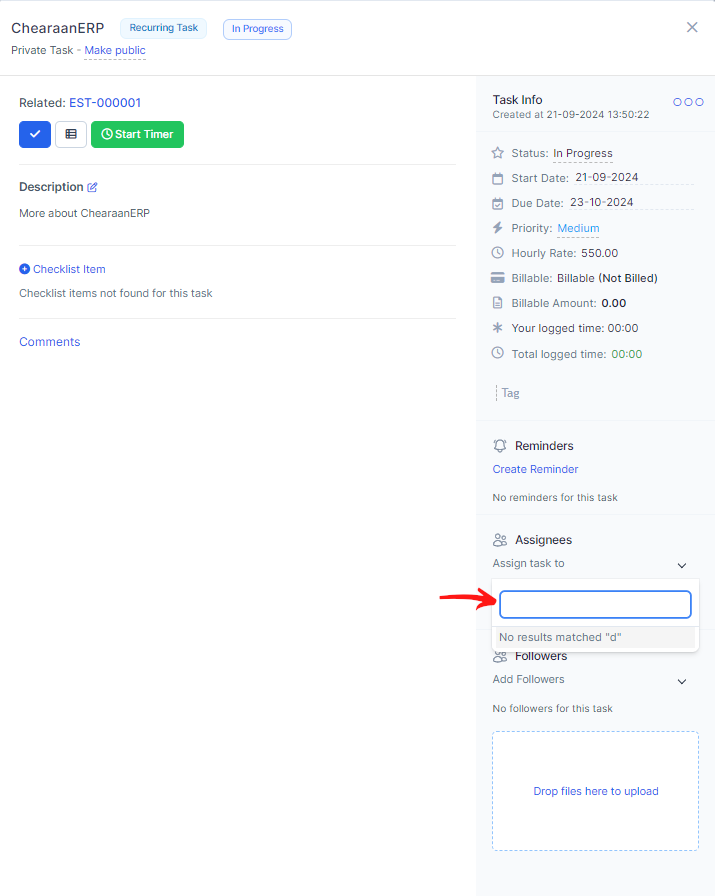
You can add unlimited number assignees to specific task and track their time logged.

After you add member as assigned to task this member will get notification email and built-in that is assigned to this specific task.

When task is related to project only project members will be shown in the dropdown while selecting members as assignees.

Did you find this article useful?

  • Create New Task

    In order to create a new task, from the main menu navigate to Tasks and click on the ...
  • Copy Task

    In Accentra task can be easily copied to be re-used and save valuable time creating each task again ...
  • Linking task to features

    Task can be linked to any important features in Accentra to keep track of your work and assign impor...
  • Recurring Tasks

    Recurring tasks is a feature that allows you to create tasks that will repeat on a given period. To ...
  • Add task assignees

    To add task assignees open the task by clicking on the task subject while the tasks are listed. On t...